


The kernel world
Hello everyone. Today I’m starting a series of articles about the kernel world. I should mention upfront that the book “A guide to kernel exploitation - Exploiting the core” is the main source for this series.
I’ve read it inside and out, but it’s in English and relatively long, so I’m trying here to provide a clear and digestible summary so that as many people as possible can benefit from it. I hope that after reading this, you’ll have a sufficiently broad and deep understanding of how the kernel works to get past the copy/paste stage when reading practical tutorials.
Of course, I’m not just doing a simple summary; I try as much as possible to add diagrams or examples to make this series as enjoyable as possible to read.
Introduction
When you use your computer every day, browsing the internet, watching movies, or even coding, a huge machinery is at work behind the scenes to make your life easier. To use your wifi or listen to music, you have to communicate with the hardware at some point, and yet you don’t need to know the manufacturer of your network card or your sound card. This is possible because you’re using an operating system (OS) that serves as an abstraction layer for these various constraints. And the heart of the OS is what we call the kernel.
The following diagram summarizes this breakdown in a very high-level way.
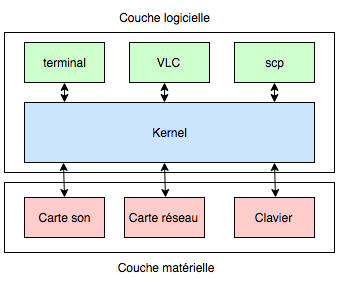
In general, the kernel is the part that essentially handles what’s critical to the machine’s proper functioning, such as hardware access, resource management or security. The OS, on the other hand, encompasses the kernel and the programs/libraries that sit on top of it, the runtime, such as the libc on Linux, the init binary, etc.
To work in a serene and secure way, the kernel needs to set up barriers between critical actions and the others. To do this, it acts at both the hardware level and the software level.
- At the hardware level, most CPUs have instruction sets that offer two execution modes. The first is a privileged mode in which all instructions are available, while the second is a non-privileged mode, giving access only to a subset of instructions.
- At the software level, the kernel arranges to have access to the memory ranges of all running processes, while forbidding other processes from accessing its own memory range. The kernel’s memory range is called Kernel-Land, while the memory range each process sees is called User-Land.
Of course, these protections, while necessary, are not always sufficient. Today, all computer systems are multi-user and multi-tasking. For example, a user shouldn’t be able to monopolize all the memory or all the bandwidth. There also needs to be the possibility of adding, removing or modifying users, or modifying the kernel for example to update it. To meet these needs, all users have a unique identifier called UID (User ID), but there’s one UID that is special, and that grants higher privileges than all the others. It’s the administrator on Windows, or the root on Unix, generally 0. This user can often modify the kernel, can always manage users, etc. They are the all-powerful one, the one we want to impersonate when it comes to exploiting a system.
Why the kernel?
For a long time, attackers focused on User-Land, which logically led to the adoption of security measures such as ASLR, canaries, NX zones, etc. User-Land is becoming more and more protected. Furthermore, exploiting the kernel gives more privileges to the attacker. So it makes sense that attackers’ attention is turning to the kernel.
However, writing exploits to take advantage of vulnerabilities in the kernel is not as simple as in User-Land. Indeed, if there’s an error in User-Land, the application crashes. If there’s an error in Kernel-Land, the kernel crashes. And the kernel is the heart of the OS, so if it crashes, the machine may stop working and shut down. And that’s annoying, because we can no longer do anything. Furthermore, we said that the kernel is protected at both the hardware and software level, so it’s harder to find information, especially since ALL running processes affect the kernel’s state, so the memory layout of kernel-land changes quickly, not simple. Finally, the kernel is extremely large and complex, so the attacker has to understand many mechanisms to find and then exploit vulnerabilities.
What are the kernel’s vulnerabilities?
Without being exhaustive, several types of vulnerabilities exist.
The kernel is responsible for scheduling the various tasks to simulate multi-tasking behavior. We won’t go into the details of scheduling, but the fact that the kernel switches from one task to another enables the use of race conditions. That is, a more or less long time can elapse between two instructions, and if the first instruction is a permission check and the second is an action taken if the permissions are validated, it’s possible to modify things between the check and the action so that the action is performed on something other than what was intended.
In addition, to switch from one process to another, the kernel has to remember information such as open files, the process’s privileges, and which memory pages are used by it. If we find where this information is stored and we modify it, it can get interesting.
Then, the kernel is responsible for managing virtual memory. The article on memory management talks about it briefly, but let’s add a few pieces of information and terms here. Physical memory is divided into frames, and virtual memory into pages. When a process needs memory space, it requests physical memory to allocate pages. It’s the page table that makes the link between pages and frames, with one page table per process.
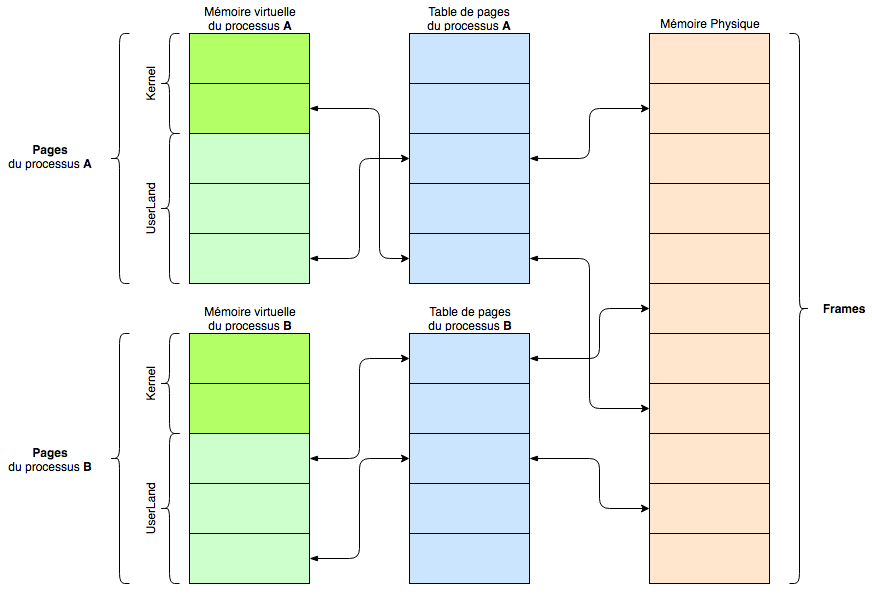
Yes, there are a lot of arrows. The idea is to show that on the left, on the virtual memory side, we have the pages that find their location thanks to the page tables that handle the translation to physical memory split into frames.
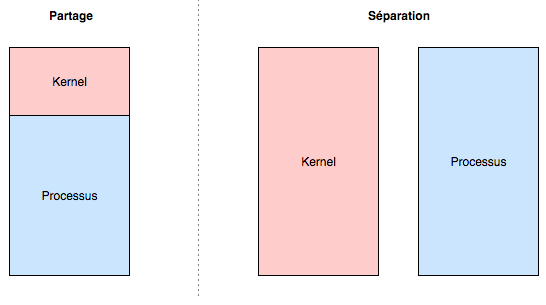
Two implementations exist for the separation of pages allocated between kernel and user.
- The first is that the virtual memory range assigned to a process is shared. One part for the process, the other part for the kernel. To do this, the kernel page table entries are replicated in the process’s page table. This is the implementation that was represented in the previous diagram.
- The second is that the kernel and the process both have a complete and independent memory zone.
Schematically, this gives us:
But if you want a bit more detail, then it looks more like this:
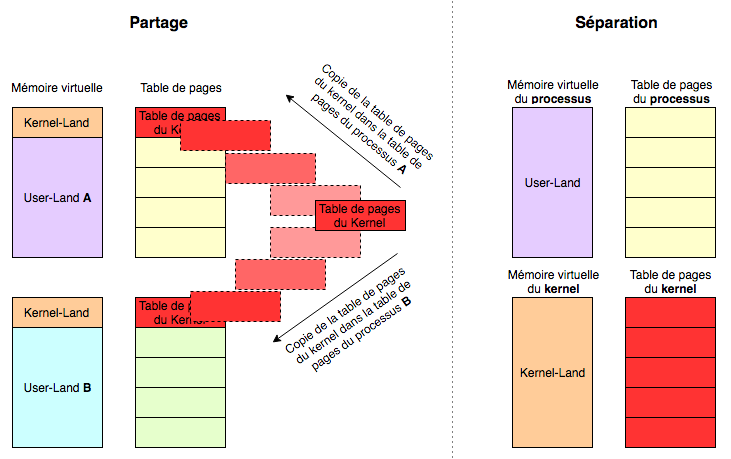
The first implementation is the more interesting one. Indeed, the CPU can have two execution contexts.
The first execution context, which doesn’t really interest us, is supervisor mode. This is when no process is attached to the context. It happens, for example, with network or disk interrupts.
But in the second one, the process context, a process is associated, called the backing process, which means that somewhere in the kernel are the information of the currently running process, and that’s cool for us. Since we control the backing process, we control user-land. And since we’re in the case where the memory range is shared with kernel-land, if we find a flaw in the kernel, we can redirect the execution flow into user-land, which we control. Perfect! Here’s a little diagram that illustrates this:
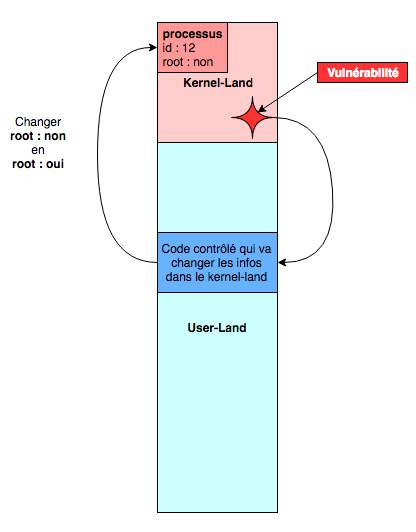
Since the kernel memory is replicated for all processes, we can create our own process. We can then exploit the vulnerability in the kernel that allows us to redirect the kernel’s execution flow into a piece of code we’ve prepared. All this code has to do is change the info of our current process to give it higher privileges, and we’re done.
So, ready to dive into this new world? The next part with kernel vulnerabilities