

Memory management
Today, I will try to gather everything I have learned about memory management during the execution of a program. This article is written with the goal of understanding the exploitation of certain application vulnerabilities, such as buffer overflow, heap overflow or format string, vulnerabilities that I will describe in upcoming articles.
Virtual memory
Processes running on a machine need memory, and in a computer, the amount of memory is limited. Processes therefore have to look for available memory in order to work. However, these days processes run in multi-tasking operating systems. Several processes run at the same time. What would happen if two processes wanted to access the same memory area at the same time? And above all, if one process wrote in a memory area, then another process overwrote that same memory area with its own data, then process A, poor thing, would expect to find its data, but would actually find B’s data. And there’s the disaster! The processes would then have to constantly communicate with each other to know who is doing what, where, and when. That would be a real waste of time and dreadfully complex for this problem.
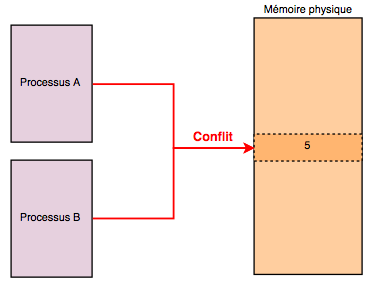
This is where virtual memory comes in: processes no longer fetch memory directly from physical memory. They are placed in sandboxes, by allocating them a range of virtual memory (4 GB for 32-bit machines), making them believe that they are the only ones running on the machine. This is where the kernel comes in, and makes the link between the various virtual memory ranges and the real memory. This is done through page tables. Here is a diagram to make things clearer:
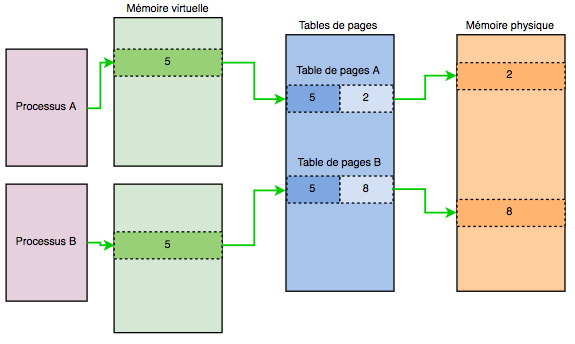
The process no longer has to worry about the implementation of memory. All low-level operations are handled by the OS kernel. It’s a kind of abstraction layer that simplifies the life of the process.
Each process has its own page table. However, if virtual addressing is enabled, it applies to all programs running on the machine, including the kernel. So a portion of the virtual space of each program has to be reserved for the kernel!
Memory segmentation
Here, we are going to see how the memory of a compiled program is segmented when it is loaded into memory in order to create a process (its image, a kind of instance, if that means anything to you).
We find the following 3 sections:
- Text (.text)
- Data (.data)
- bss (.bss)
And the following 2 memory areas:
- Heap (heap)
- Stack (stack)
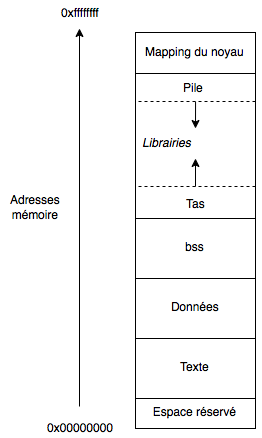
Each of these areas represents a part of the memory allocated to the process in question.
Briefly, the first text section (.text) is the one that contains the program code, and more precisely the machine language instructions. It is a read-only section: once it has been defined, it is immutable. It only serves to store code, not variables. Programming errors can lead to that famous error: “Segmentation Fault”, which indicates to the user that an unauthorized write was attempted in this memory area.
Because of its immutability, it is a fixed-size memory area. The program will therefore start at the beginning of this segment, then read the instructions one by one. However, this reading is not linear. Indeed, with the high-level code that we produce, there are many control structures that lead to calls to pieces of code that are not one after the other. We will explain later how the execution of the program works, in particular with the help of registers.
The data section (data) and the bss section store the program’s global and static variables. If these data are initialized, they are stored in the data section, while the others are in the bss section. These are also fixed-size memory areas. Despite being writable, final and static variables will not change during the execution of the program or the context. It is because they are in this memory area that they can persist.
We can take an example in C. Take the following empty program. Let’s examine the size of its different sections.
#include <stdio.h>

int main(void) {
    return 0;
}
hackndo@becane:~/exemples$ gcc memory.c -o memory
hackndo@becane:~/exemples$ size memory

text data bss dec  hex filename
1073 560  8   1641 669 memory
Now let’s add an uninitialized global variable and study the sizes of the different sections again
#include <stdio.h>

int global;

int main(void) {
    return 0;
}
hackndo@becane:~/exemples$ gcc memory.c -o memory
hackndo@becane:~/exemples$ size memory

text data bss dec  hex filename
1073 560  12  1641 669 memory
We notice that the bss section has increased by 4 bytes to store the uninitialized static variable. If, in the same way, we add a static variable inside the main() function
#include <stdio.h>

int global;

int main(void) {
    static int var;
    return 0;
}
hackndo@becane:~/exemples$ gcc memory.c -o memory
hackndo@becane:~/exemples$ size memory

text data bss dec  hex filename
1073 560  16  1641 669 memory
Again, we notice that bss has increased by 4 bytes to store this variable. If we now initialize the variable var
#include <stdio.h>

int global;

int main(void) {
    static int var = 10;
    return 0;
}
hackndo@becane:~/exemples$ gcc memory.c -o memory
hackndo@becane:~/exemples$ size memory

text data bss dec  hex filename
1073 564  12  1641 669 memory
This time, the variable is no longer stored in the bss section, but in the data section, since we notice that it went from 560 to 564 while the bss section decreased by 4 bytes. Finally, if we also initialize the global variable global
#include <stdio.h>

int global = 200;

int main(void) {
    static int var = 10;
    return 0;
}
hackndo@becane:~/exemples$ gcc memory.c -o memory
hackndo@becane:~/exemples$ size memory

text data bss dec  hex filename
1073 568  8   1641 669 memory
Both variables are stored in the data section, and no longer in the bss section.
The heap is, in turn, manipulable by the programmer. It is the area in which dynamically allocated memory areas are written (malloc() or calloc()). Like the stack, this memory area has no fixed size. It grows and shrinks depending on the programmer’s requests, who can reserve or remove blocks via allocation or deallocation algorithms for future use. As the size of the heap grows, the memory addresses grow, and get closer to the memory addresses of the stack. The size of variables in the heap is not limited (except for the physical memory limit), unlike the stack.
Furthermore, variables stored in the heap are accessible anywhere in the program, through pointers. However, since access to variables stored in the heap is only done with pointers, this slows these accesses down a little, unlike accesses on the stack.
The stack also has a variable size, but the more its size grows, the more the memory addresses decrease, getting closer to the top of the heap. This is where we find the local variables of functions as well as the stack frame of these functions. The stack frame of a function is a memory area, in the stack, in which all the information needed to call this function is stored. The local variables of the function are also found there.
You should therefore now have a clearer idea of the segmentation of memory during the execution of a program. However, there is still an important notion missing, which is the management of registers. By explaining their operation and usefulness, we will be able to better understand the notion of stack frame.
Registers
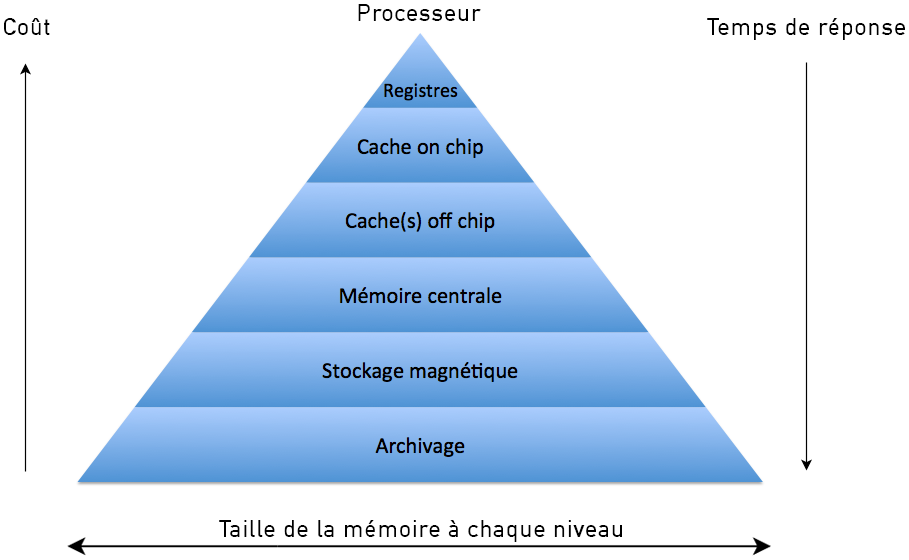
Registers are memory locations that are inside the processor. Now in a computer, the memory locations closest to the processor are the ones that are fastest to access, but also the most expensive. Thus, the further away from the processor we get, the longer the accesses, but the lower the costs. Registers are the closest memory locations (since they are internal to the processor), so they are the fastest memory in the computer. This memory pyramid is shown in the following figure, which contrasts the cost of memory with its access time by the processor:
The 32-bit x86 processor has (logically) 8 general-purpose registers (EAX, EBX, ECX, EDX, ESP, EBP, ESI, EDI)
For 64-bit processors, there are 16 logical registers. But in reality, the latest processors have 168 of them, in order to parallelize the instructions.
There are two groups:
- The 4 EAX, EBX, ECX and EDX called Accumulator, Base, Counter, Data have the role of storing temporary data for the processor when it executes a program.
- The other 4 registers ESP, EBP, ESI and EDI called Stack Pointer, Base Pointer, Source Index and Destination Index are rather used as pointers and indexes, as their names indicate. For example, the first two store 32-bit addresses (designating memory locations) to delimit the current stack frame.
We also have two other registers, a bit more special:
- The EIP register is called Instruction Pointer. It contains the address of the next instruction that the processor must execute.
- Finally, the EFLAGS register which, in reality, contains indicators, switches, flags essentially used for comparisons, but not only.
To go further, you can read the article on how the stack works.