

Canary Technique: Bypass
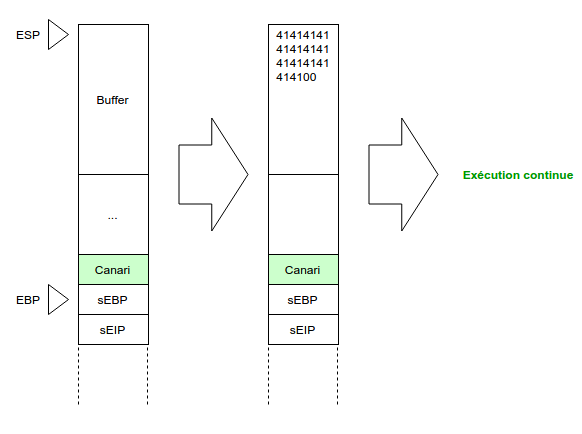
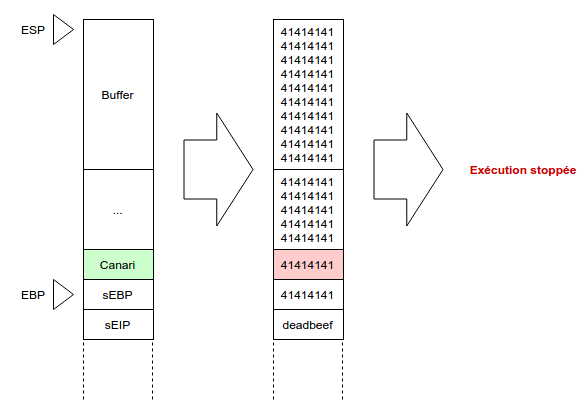
Hi, today I worked on a binary that used a technique to limit the damage caused by a buffer overflow. It is called Stack-Smashing Protector (also known as SSP). It is a gcc extension. In the case of the binary I studied, to protect against buffer overflows, gcc adds a secret value on the stack, called the canary, just before the saved EBP. A buffer overflow is generally used to overwrite the saved EIP, which is located right after the saved EBP. So if that happened, the secret value would also be overwritten. A check on this value is performed before exiting the function, and if it has been modified, the program terminates abruptly and throws tomatoes at our face.
The following figures illustrate the two possible outcomes.
Example
We are going to see an example of this type of protection here. To do that, we will reuse the program from the buffer overflow article:
#include <stdio.h>
#include <stdlib.h>
#include <string.h>

void func(char *arg)
{
    char buffer[64];
    strcpy(buffer,arg);
    printf("%s\n", buffer);
}

int main(int argc, char *argv[])
{
    if(argc != 2) printf("binary \n");
    else func(argv[1]);
    return 0;
}
This time, however, we are going to compile it in a different way so that this protection is in place:
$ gcc -Wall -m32 -fstack-protector -o canari canari.c
We now have a binary with this protection. The checksec.sh tool lets us confirm it:
$ ./checksec.sh --file canari
RELRO      STACK CANARY   NX           PIE      RPATH      RUNPATH      FILE
No RELRO   Canary found   NX enabled   No PIE   No RPATH   No RUNPATH   canari
Let’s then try to provoke a silly overflow:
$ ./canari $(perl -e 'print "A"x100')

AAAAAAAAAAAAAAAAAAAAAAAAAAAAAAAAAAAAAAAAAAAAAAAAAAAAAAAAAAAAAAAAAAAAAAAAAAAAAAAAAAAAAAAAAAAAAAAAAAAA
*** stack smashing detected ***: ./canari terminated
Ouch. There we go, we got a tomato in the face. At least it’s clear, we can no longer play with the stack. Sniff.
But then what exactly happened? Let’s look at what our new binary looks like in gdb:
$ gdb -q canari
Reading symbols from /home/betezed/blog/exemples/canari...(no debugging symbols found)...done.
gdb-peda$ disas main
Dump of assembler code for function main:
 0x080484f3 <+0>:  push ebp
 0x080484f4 <+1>:  mov ebp,esp
 0x080484f6 <+3>:  and esp,0xfffffff0
 0x080484f9 <+6>:  sub esp,0x10
 0x080484fc <+9>:  cmp DWORD PTR [ebp+0x8],0x2
 0x08048500 <+13>: je 0x8048510 <main+29>
 0x08048502 <+15>: mov DWORD PTR [esp],0x80485c0
 0x08048509 <+22>: call 0x8048380 <puts@plt>
 0x0804850e <+27>: jmp 0x8048520 <main+45>
 0x08048510 <+29>: mov eax,DWORD PTR [ebp+0xc]
 0x08048513 <+32>: add eax,0x4
 0x08048516 <+35>: mov eax,DWORD PTR [eax]
 0x08048518 <+37>: mov DWORD PTR [esp],eax
 0x0804851b <+40>: call 0x80484ac
 0x08048520 <+45>: mov eax,0x0
 0x08048525 <+50>: leave
 0x08048526 <+51>: ret
End of assembler dump.
gdb-peda$ disas func
Dump of assembler code for function func:
 0x080484ac <+0>:  push ebp
 0x080484ad <+1>:  mov ebp,esp
 0x080484af <+3>:  sub esp,0x78
 0x080484b2 <+6>:  mov eax,DWORD PTR [ebp+0x8]
 0x080484b5 <+9>:  mov DWORD PTR [ebp-0x5c],eax
 0x080484b8 <+12>: mov eax,gs:0x14
 0x080484be <+18>: mov DWORD PTR [ebp-0xc],eax
 0x080484c1 <+21>: xor eax,eax
 0x080484c3 <+23>: mov eax,DWORD PTR [ebp-0x5c]
 0x080484c6 <+26>: mov DWORD PTR [esp+0x4],eax
 0x080484ca <+30>: lea eax,[ebp-0x4c]
 0x080484cd <+33>: mov DWORD PTR [esp],eax
 0x080484d0 <+36>: call 0x8048370 <strcpy@plt>
 0x080484d5 <+41>: lea eax,[ebp-0x4c]
 0x080484d8 <+44>: mov DWORD PTR [esp],eax
 0x080484db <+47>: call 0x8048380 <puts@plt>
 0x080484e0 <+52>: mov eax,DWORD PTR [ebp-0xc]
 0x080484e3 <+55>: xor eax,DWORD PTR gs:0x14
 0x080484ea <+62>: je 0x80484f1 <func+69>
 0x080484ec <+64>: call 0x8048360 <__stack_chk_fail@plt>
 0x080484f1 <+69>: leave
 0x080484f2 <+70>: ret
End of assembler dump.
gdb-peda$
OK, we have the disassembled versions of the main and func functions. The main function does not seem to have been modified. However, the func function has a rather strange end:
0x080484e0 <+52>: mov eax,DWORD PTR [ebp-0xc]
0x080484e3 <+55>: xor eax,DWORD PTR gs:0x14
0x080484ea <+62>: je 0x80484f1 <func+69>
0x080484ec <+64>: call 0x8048360 <__stack_chk_fail@plt>
We notice these 4 unusual lines. A value is taken from the stack, just before EBP, then it is compared to a value located in the gs segment at address 0x14. This segment is specific to the currently running process. This is in fact the secret value we were talking about earlier, generated randomly at every execution. To convince ourselves, let’s place a breakpoint at address 0x080484e3 to see the content of EAX when the behavior is normal (so when we haven’t overwritten the canary):
gdb-peda$ r
...
gdb-peda$ i r eax
eax 0xdad6e600 0xdad6e600
gdb-peda$
gdb-peda$ r
...
gdb-peda$ i r eax
eax 0x9a9c0100 0x9a9c0100
We see that two canaries are generated between executions, and have no relation to each other. But since we did not modify anything at this level, the following instructions:
0x080484e3 <+55>: xor eax,DWORD PTR gs:0x14
 0x080484ea <+62>: je 0x80484f1 <func+69>
compare this canary with the original value. Since it is not modified, the xor gives the value 0 and the JE jump is taken, skipping the call to __stack_chk_fail, thus avoiding being hit by tomatoes.
Now, let’s attempt a buffer overflow:
gdb-peda$ r $(perl -e 'print "A"x100')
...

gdb-peda$ i r eax
eax 0x41414141 0x41414141
There we go, we replaced the canary. Woe is us! If we execute the few instructions that follow:
gdb-peda$ ni
gdb-peda$ ni

[-------------------------------------code-------------------------------------]
   0x80484e0 <func+52>: mov eax,DWORD PTR [ebp-0xc]
   0x80484e3 <func+55>: xor eax,DWORD PTR gs:0x14
   0x80484ea <func+62>: je 0x80484f1 <func+69>
=> 0x80484ec <func+64>: call 0x8048360 <__stack_chk_fail@plt>
   0x80484f1 <func+69>: leave
   0x80484f2 <func+70>: ret
   0x80484f3 :    push ebp
   0x80484f4 <main+1>:  mov ebp,esp
As expected, we don’t take the JE jump at line func+62 and fall straight into the call to __stack_chk_fail which terminates our program.
Exploitation
BUT we are not going to give up.
The canary is generated randomly for each process at run-time, often by pulling bytes from /dev/urandom (good luck if you try to predict what will be generated). So in principle, we cannot try to brute-force it!
In fact, there is one case in which we can get out of it without much difficulty, and that’s the one I encountered:
If the binary is a server that accepts incoming connections, two cases arise:
- Either the binary performs a
fork()when it receives a connection, so the process is literally duplicated, including the canary value. - Or the binary performs a
fork()then anexecve(). Whenexecve()is called, the text, data, bss and stack sections of the process making the call are replaced by the sections of the program loaded in memory. So the canary is renewed.
In the first case, we clearly understand what this implies: the canary was generated once when the server was launched, and every time we connect, this value is copied into our fork without being modified. Interesting!
It is then enough to fill the buffer just enough to replace only the first byte of the canary. The chances are slim that it will be the right value. However, there are only 256 possibilities (maximum value of a byte). So in a maximum of 256 attempts, we can find the first byte of the canary.
For 32-bit systems, the canary has a size of 4 bytes, while for 64-bit systems, the canary has a size of 8 bytes. This means that for a 32-bit system, a maximum of 4 * 256 = 1024 attempts is needed to find the canary, and 2048 attempts for a 64-bit system. And that’s very doable!
Here is a diagram that summarizes this brute force for a 32-bit system:
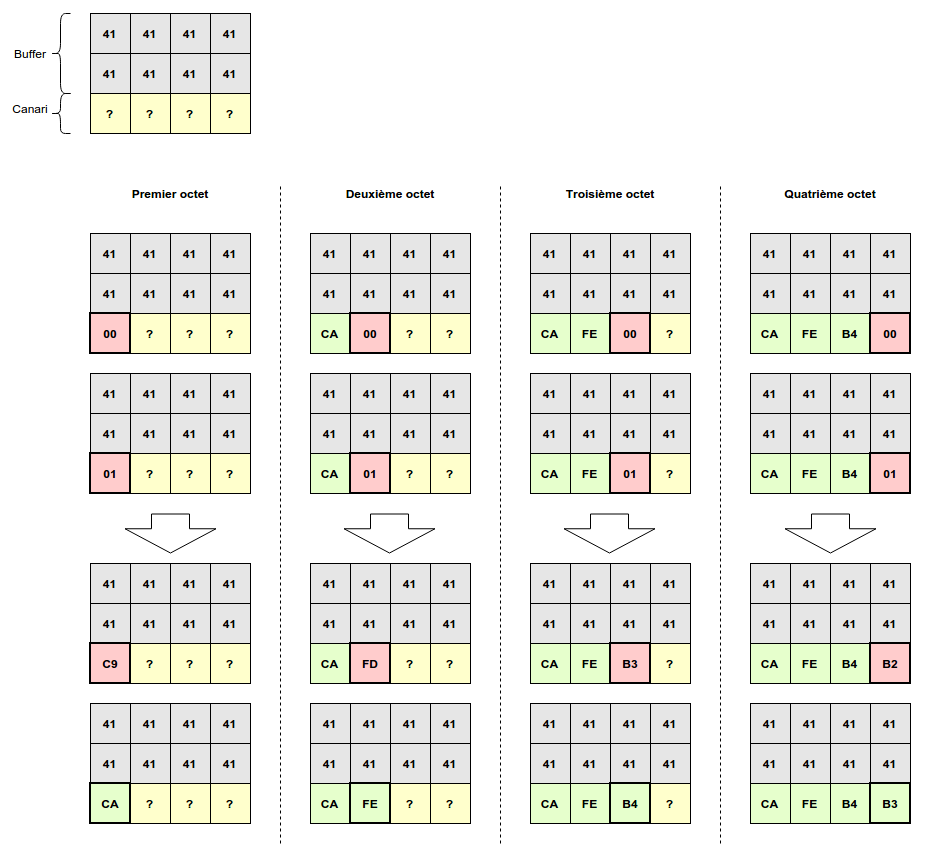
In the first drawing at the top left, we see the buffer stopping just before the canary, the latter having a value that is still unknown to us. We then add a byte to the buffer, \x00, to overwrite the first byte of the canary. But since it’s not the right byte, the program closes. We then try the next byte \x01 but the program closes again. When we try \xCA, this time everything’s fine. We discovered the first secret byte! We then move on to the second byte (second column in this diagram), and so on until we discover the canary in its entirety!
Once this value is discovered, all that is left is to perform a classic buffer overflow exploitation. For that, I advise you to read the article on buffer overflows or the one on return to libc.
To your keyboards! </content> </invoke>