

Resource-Based Constrained Delegation - Risks
This article shows how to abuse Resource-Based Constrained Delegation in order to take control of machines.
It is based on excellent content. I have tried to summarize in simple words a small part of Elad Shamir’s work. His article Wagging the Dog: Abusing Resource-Based Constrained Delegation to Attack Active Directory is incredible because of its research. Other articles followed, notably the one by Dirk-jan (The worst of both worlds: Combining NTLM Relaying and Kerberos delegation) and the one by Harmj0y (A Case Study in Wagging the Dog: Computer Takeover), allowing me to put all the pieces together and write this article.
Are you ready? Let’s dive in.
Reminder: Resource-Based Constrained Delegation
In this article, the term “Resource-Based” will be used to refer to this delegation.
Unlike Unconstrained Delegation, Resource-Based delegation is a bit more complicated. The general idea is that it is the end-of-chain resources that decide whether or not a service can authenticate against them as another user. These resources therefore have a list of accounts they trust. If a resource trusts the WEBSERVER$ account, then when a user authenticates against WEBSERVER$, it will be able to authenticate itself against this resource as that user.
On the other hand, if another user authenticates against an account that is not part of the service’s trust list (for example FILESERVER$ or Sql_SVC in the diagram below), this account will not be able to impersonate this user against the service.
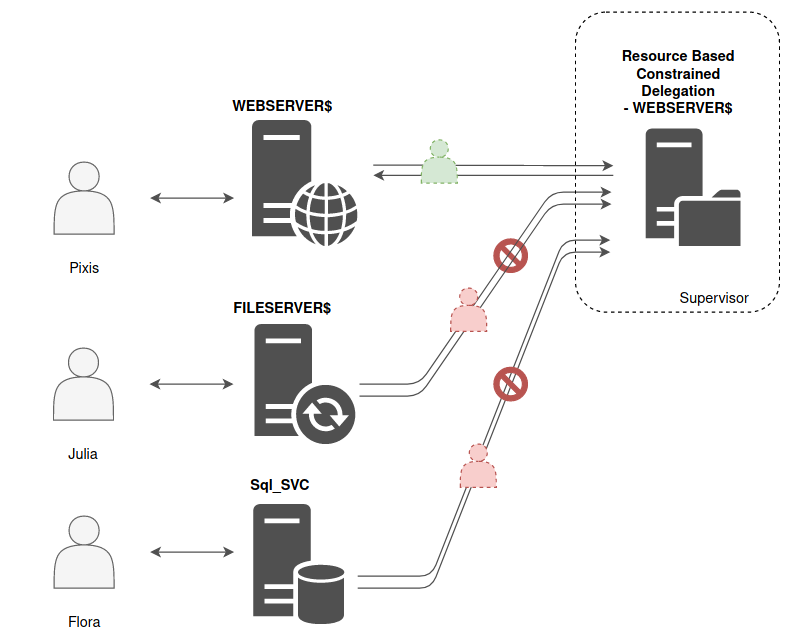
Concretely, as explained in the article on delegation, the final resource, on the right of the diagram, has an attribute called msDS-AllowedToActOnBehalfOfOtherIdentity which contains the list of accounts it trusts.
Moreover, for this delegation to work, the ADS_UF_NOT_DELEGATED attribute of the user must not be set. It is an attribute that allows the user to forbid delegation in order to protect the account from delegation-related attacks.
Also note that to relay a user’s authentication, the “relay” service account (WEBSERVER$ in the diagram) must have a TGS coming from the user.
If the user authenticates via Kerberos, no problem, the “relay” service has the user’s TGS, so the mechanism (S4U2Proxy) is simple, the service account sends the user’s TGS to the domain controller so that the latter sends back a valid TGS to access the desired resource (provided of course the service account is part of the resource’s trust list).
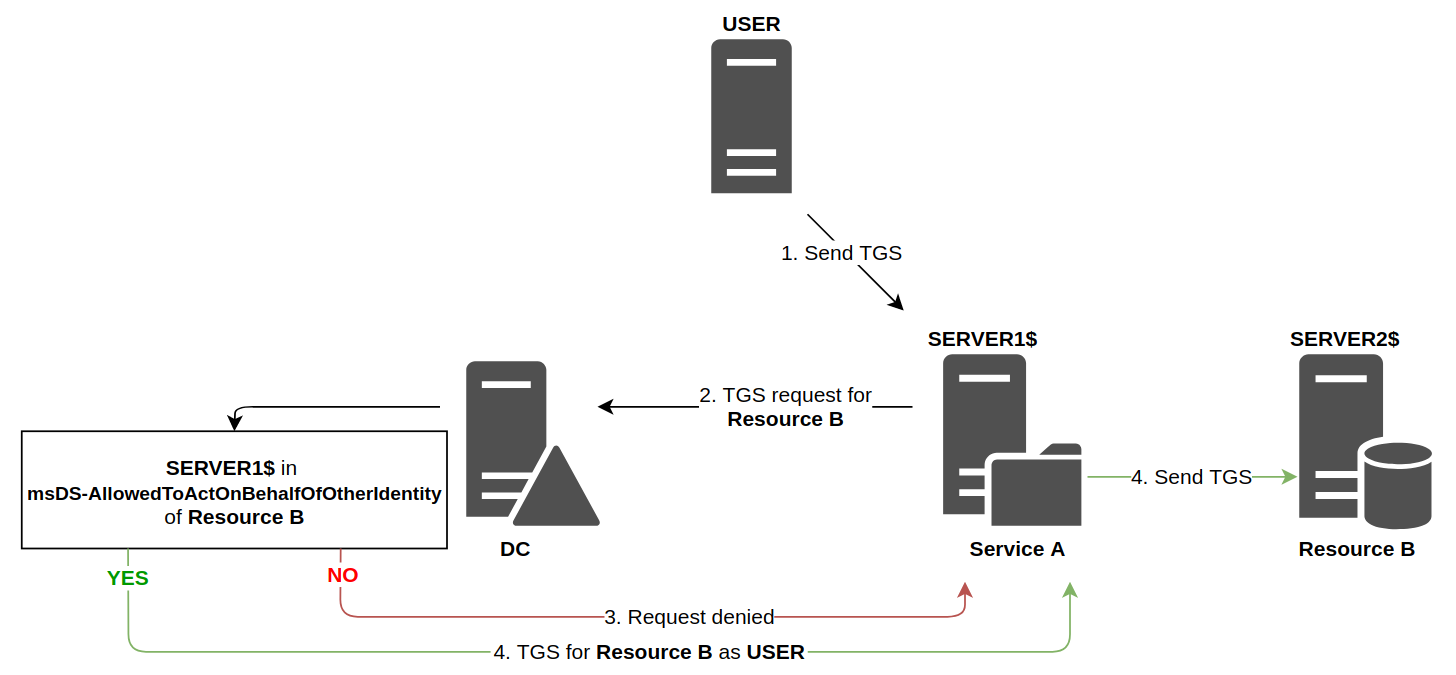
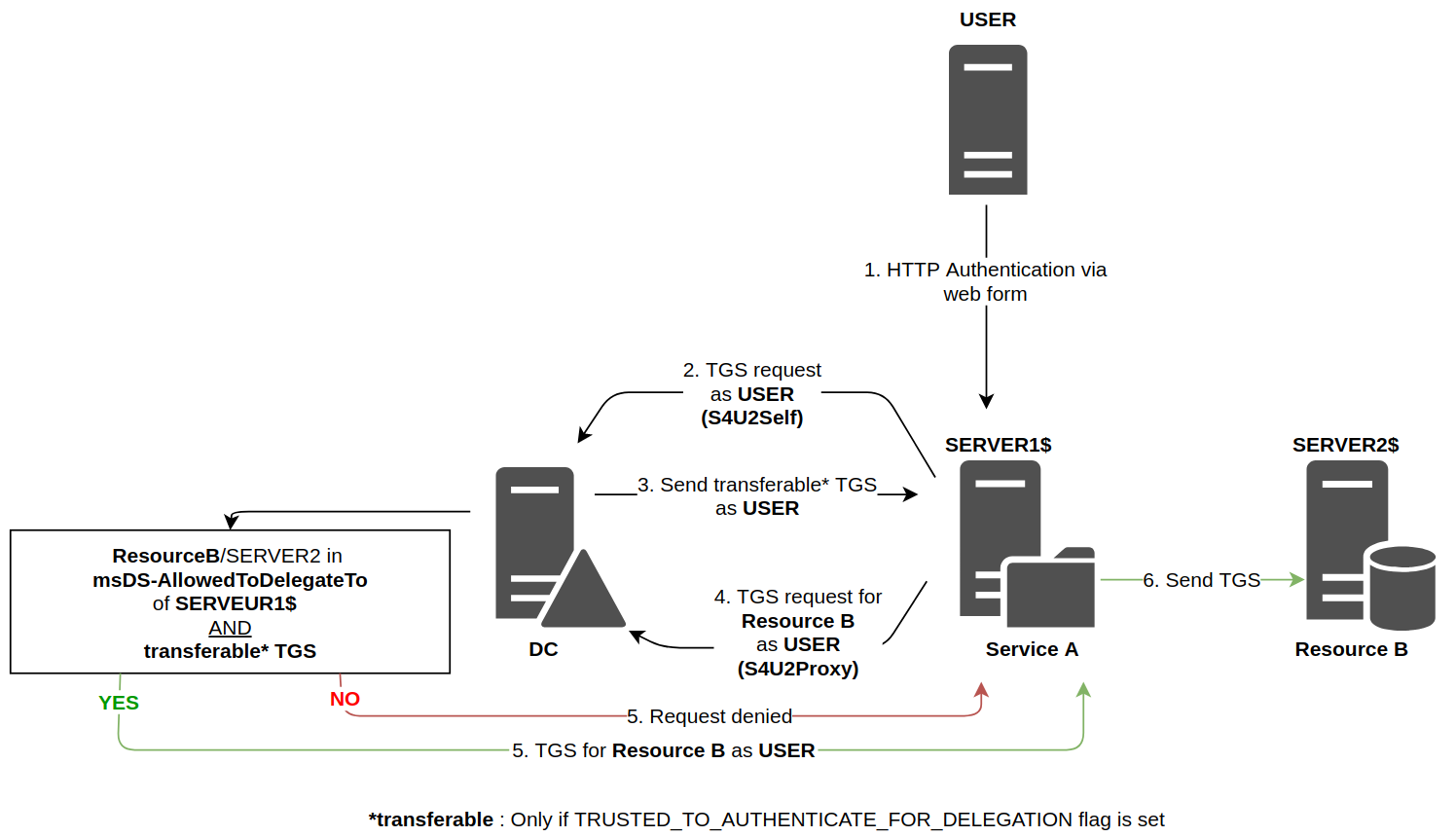
On the other hand, if the user authenticates in another way (NTLM for example), the service account has not received a TGS. It will then have to make a first request to obtain a forwardable TGS on behalf of the user, this is the S4U2Self mechanism, then it will use this forwardable TGS to perform the process explained just before, S4U2Proxy.
“By design” behavior
Now that these reminders are done, it is interesting to dig a little deeper. Indeed, we realize that the S4U2Self mechanism can be quite dangerous, because a service can ultimately request a TGS on behalf of any user. In the normal process, it requests a TGS on behalf of the user who authenticated against it, but nothing forces it to limit itself to that account.
Fortunately, this possibility of requesting forwardable TGSs on behalf of anyone (S4U2Self) is only possible for accounts that have the TrustedToAuthForDelegation attribute set, which is not an attribute set by default, and which is rarely found in enterprises.
More precisely, all service accounts can perform an S4U2Self, but only those with the TrustedToAuthForDelegation attribute will receive a forwardable TGS, which is a priori a necessary condition for S4U2Proxy (see Microsoft documentation).
Thus, for example, during a constrained delegation (not Resource-Based), if a computer account requests a TGS via S4U2Self without having the TrustedToAuthForDelegation attribute, this account will receive a non-forwardable TGS, and when requesting a TGS for a resource (S4U2Proxy), it will be denied since this TGS cannot be forwarded.
However, and this is where it gets super incredible, in the case of Resource-Based delegation, if in the same way a computer account requests a TGS via S4U2Self without having the TrustedToAuthForDelegation attribute, this account will receive a TGS that will still be non-forwardable, but when requesting a TGS for a resource (S4U2Proxy), this request WILL BE ACCEPTED (see again Microsoft documentation).
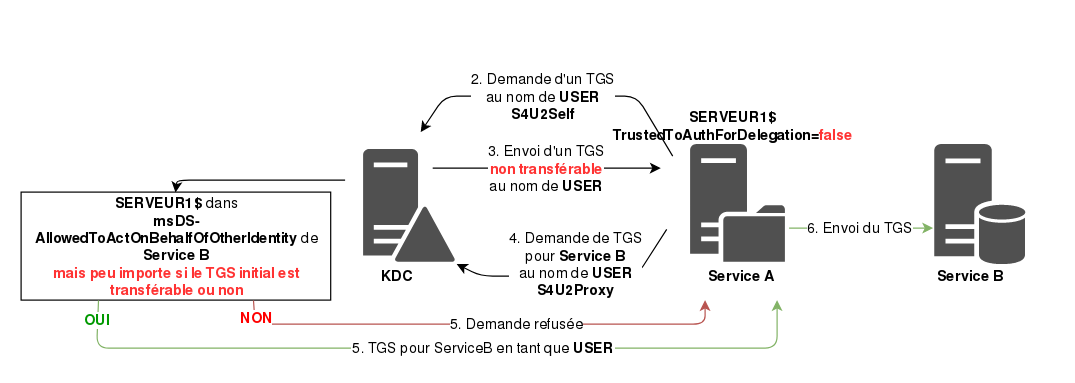
In this example, SERVER1$ does not have the TrustedToAuthForDelegation attribute set, but it is declared in Service B’s trust list. When requesting a TGS for a random user via S4U2Self, the domain controller sends back a non-forwardable TGS, however by passing this TGS to the S4U2Proxy request in order to retrieve a TGS to use Service B, there is no problem, it works, and SERVER1$ can use Service B as the chosen user.
In case it is still not clear, this means that SERVER1$ can authenticate against Service B as any user.
Yep.
Machine-Account-Quota attribute
In order to describe a complete attack path, we also need to talk about the msds-MachineAccountQuota attribute which is set on the domain. This attribute describes the number of computer accounts that a domain user can create. This attribute defaults to 10. This means that, by default, a user can join 10 machines to the domain, or that they can create 10 computer accounts, in particular choosing their name and password.
This behavior can be modified via GPO, but by default, it is 10.
This addition can be made directly in a Windows machine’s settings, but also via LDAP. This feature is notably available in the Powermad tool by Kevin Robertson.
New-MachineAccount -MachineAccount NEWMACHINE -Password $(ConvertTo-SecureString "Hackndo123+!" -AsPlainText -Force)
This feature is important because in delegation stories, the affected accounts are service accounts, that is to say accounts with one or more SPNs. A domain user does not have an SPN attribute, but they can create a computer account which by default has several SPNs.
Exploitation
We now have all the elements in hand to describe an attack path. Others exist, of course, but this path allows us to assemble all the pieces of the puzzle.
We place ourselves in the case of a man-in-the-middle position by using the fact that IPv6 is mostly enabled in enterprise networks, and that from an OS point of view, this is the protocol that should be used first, before IPv4. An attacker can then position themselves as an IPv6 DHCP server and respond to surrounding equipment.
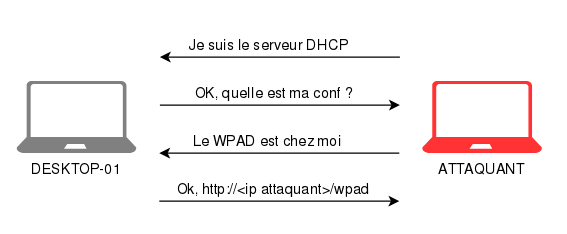
Furthermore, it is possible to relay an HTTP authentication from one machine into an LDAPS authentication to another. We will relay connections to the domain controller.
When the DESKTOP-01 machine connects to the network (reboot, network cable plugged in), the DESKTOP-01$ account will connect via HTTP to our machine due to our man-in-the-middle position. This is when the relay will be effective.
Two actions will be performed via LDAPS, using this relayed authentication, as DESKTOP-01$.
- A computer account
HACKNDO$will be created, since theDESKTOP-01$account is a domain account, and has the right to add 10 computer accounts to the domain, by default. - The
DESKTOP-01$computer account has the right to modify some of its attributes, including themsDS-AllowedToActOnBehalfOfOtherIdentityattribute, which is the list of trusted machines for “Resource-Based” delegation. We will therefore modify this attribute to addHACKNDO$to this trust list.
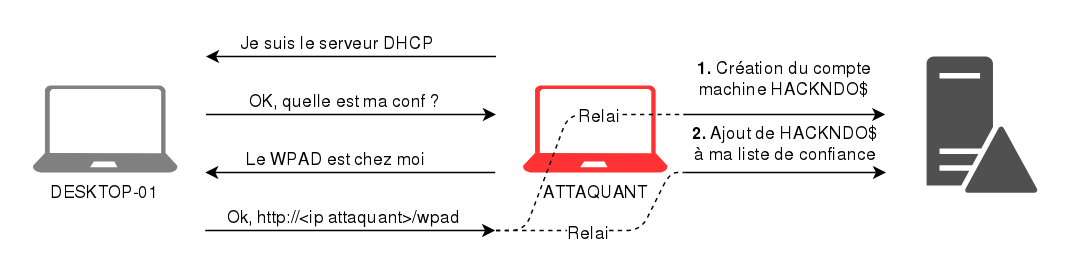
Now, we have control of the HACKNDO$ account, since we chose its name and password during creation, and this account is trusted by DESKTOP-01$.
All that is left is to connect as HACKNDO$, request a TGS on behalf of an administrator via S4U2Self. The domain controller will respond with a non-forwardable TGS. We then request a TGS to use the CIFS service of DESKTOP-01 (CIFS/DESKTOP-01) by providing the previously requested TGS (S4U2Proxy). As we saw at the beginning, although it is not forwardable, it is still accepted, and the domain controller sends us a TGS as administrator to use the CIFS service of DESKTOP-01.
Here is a small summary diagram:
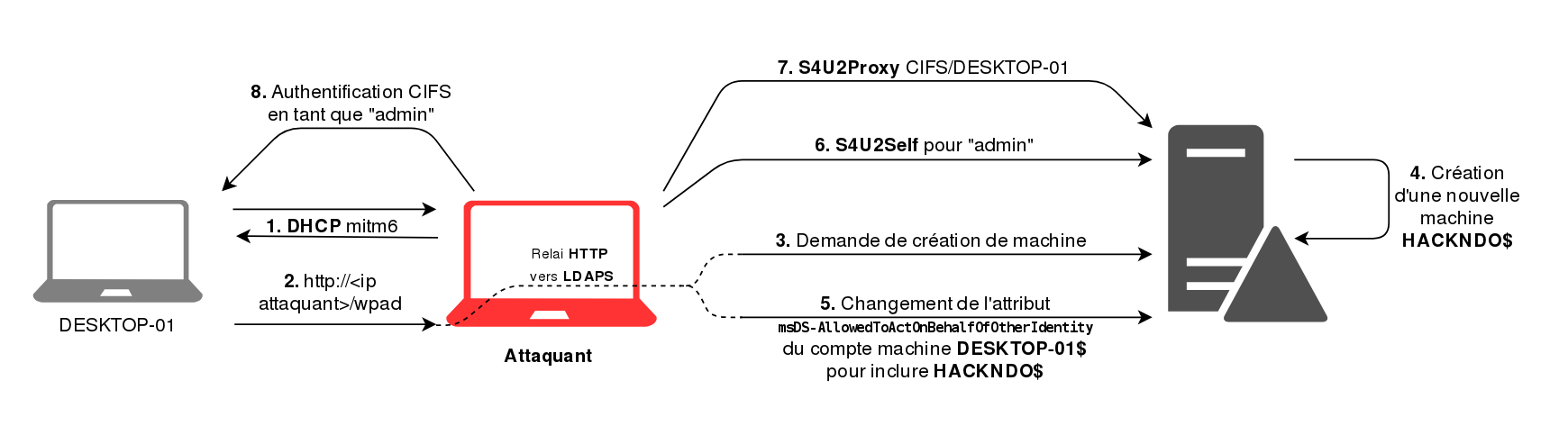
It is possible to repeat the operation to request a TGS in order to be able to manage services. Thus, by sending a “reverse-shell” type executable to the machine with the CIFS ticket, then by creating and starting a service using this executable with the help of a SCHEDULE ticket, it is possible to take control of the machine as SYSTEM.
Summary
The operation being a bit complex, here are the different steps summarized:
- Add a machine
Mto the domain (via an authentication relay, via an already owned domain account, …) - Add this machine
Mto the trust list of the targetC(i.e. add it to themsDS-AllowedToActOnBehalfOfOtherIdentityattribute by relaying the target machine’s authentication, since it has the right to change its own attribute) - Request a TGS for a ticket on behalf of an administrator via S4U2Self
- Once in possession of this ticket, send it to the domain controller to request a TGS to the target
Cvia S4U2Proxy. - Enjoy this new valid ticket, as the chosen administrator. Other tickets can be requested with step 4.
Conclusion
“Resource-Based” delegation is a complex process, so complex that security issues have been introduced into the implementation of the feature.
What ultimately needs to be remembered is that it is possible to take control of a machine when one has the ability to modify its trust list in the context of resource-based delegation.
To protect against this, several actions are possible. First, channel binding must be implemented at the LDAP level in order to prevent relaying to LDAPS. Next, the ability to create computer accounts on the domain must be limited to defined groups of users. Finally, in connection with this example, IPv6 should be disabled in enterprise networks, since it does not meet any need.
This article being relatively dense, it would be perfectly normal for some points to not be entirely clear. If you have any questions, feel free to ask them in the comments or on Discord. You can always follow new article releases on my twitter @hackanddo.
Finally, feel free to check out the cited resources, in particular the article by Elad Shamir which is a complete and super interesting piece of research.