


Meltdown & Spectre Attacks
This article is an accessible technical explanation of the Meltdown and Spectre attacks, which will hopefully help others better understand the mechanisms and scope of these attacks.
The mechanisms at play
These two attacks differ from those we usually hear about. They affect the hardware, not applications. To understand these attacks, it is necessary to give a brief recap of how a processor works and is optimized.
How a processor works
A processor is nothing more than a calculator. In the beginning, calculations were sent to a processor, which performed the calculations sent to it in order, one after another, and then returned the results.
When a program is executed, the data to be processed is in the main memory (also simply called memory), or RAM. To process an instruction, the data needed for processing must be sent from main memory to the processor’s internal memory so it can process them. Then, the result is saved back to memory.
If the time taken by the processor to process the data is roughly the same as the time taken to retrieve the data from memory, then everything coordinates nicely. Indeed, while the processor is processing an instruction, the data for the next instruction is being brought in, allowing for a steady flow.
Over time, hardware has evolved, and processors have become very, very fast. So fast that they have largely outpaced memory accesses. Today, processing an instruction takes about 0.5 nanoseconds, while a memory access takes 20 nanoseconds.
Consequently, if the processor processed instructions linearly, it would spend most of its time waiting for data instead of working.
This is why manufacturers have looked into the matter to optimize the processing pipeline of their processors.
To go a bit further into details and understand the optimizations, you need to know that an Intel processor is divided into 3 parts:
- The Front-end, which retrieves instructions from memory, and breaks them into micro-instructions
- The Execution Engine, which has different execution units, Execution Units, which are nothing more than small computation centers, specialized for various tasks
- The Memory Subsystem, which allows caching data processed by the processor in order to optimize future accesses.
Here is a (simplified) view of these 3 parts
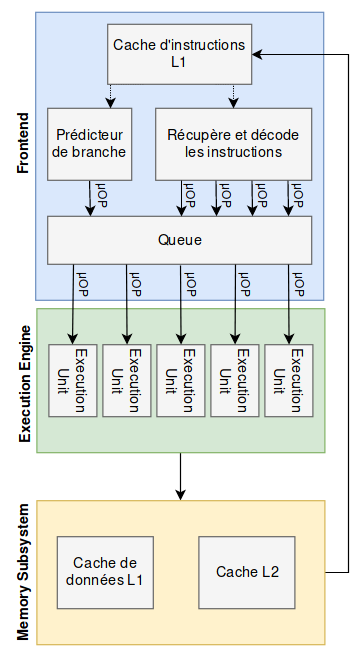
With these details in mind, we will look at the 3 optimization mechanisms that come into play in the two Meltdown and Spectre attacks, focusing mainly on the operation of Intel processors which are vulnerable to both attacks.
These optimizations exist on most recent processors. Some, however, do not implement all of them.
Cache
The first optimization mechanism we’ll talk about is the cache. The idea being that in principle, when a memory area is read, there is a good chance that it will be read again, or that an adjacent memory area will be read soon after.
This is very often the case, whether when reading a file or traversing a data array. Most of the time, reading is done in order, and the memory areas are contiguous.
Let’s take the following example, which illustrates this principle:
cache.c
#include <stdio.h>
#include <x86intrin.h>

int get_access_time(volatile char *addr)
{
    /*
     * A volatile variable is a variable on which no compiler optimization is applied,
     * which ensures that the following instructions will be performed as written, without
     * optimization (changing the order of operations, for example).
     */
    int time1, time2, junk;
    volatile int j;

    time1 = __rdtscp(&junk);
    j = *addr;
    time2 = __rdtscp(&junk);

    return time2 - time1;
}

int main(int c, char **v) {

    char pixis[] = "hackndo";

    // We flush the cache so the string is not in the cache
    _mm_clflush(pixis);

    // First access, the string is not in cache
    printf("Before caching: %d\n", get_access_time(pixis));

    /*
     * The processor accessed the string of characters.
     * Thus, it has cached the string as well as a bit
     * of memory before and after.
     */

    // Second access, after caching
    printf("After caching: %d\n", get_access_time(pixis));

    return 0;
}
A string "hackndo" is stored in main memory. We flush the cache as a precaution, then we access the string a first time. It is then fetched from main memory, then cached for future accesses. We then access it a second time. Here is the result of this program:
pixis@hackndo:~/spectre-meltdown $ make cache
cc     cache.c   -o cache
pixis@hackndo:~/spectre-meltdown $ ./cache
Before caching: 1024
After caching: 230
The two values are the number of cycles that elapsed at the moment of accessing the variable. We can see the immense benefits of the cache, which has divided the access time by almost 5!
Out-of-order
As we’ve explained, a processor computes very fast, so fast that it risks waiting a lot of time if it had to execute instructions one after another.
To address this problem, a second optimization was conceived: processors today execute instructions in parallel with their various execution units, or Execution Units.
Let’s take a simplified example:
var_A = a + b
var_B = c + d
var_C = e + f
In this case, instead of doing 3 calculations one after another, with 3 memory accesses, the processor can compute var_A, var_B and var_C at the same time, in whatever order it wants.
Thus, it can optimize these 3 instructions into 1 instruction:
var_C, var_A, var_B = e + f, a + b, c + d # Out-of-order computation, which doesn't matter
The processor has thus optimized its resources by making 3 execution units work simultaneously to perform 3 independent calculations, instead of performing them one by one while waiting for memory accesses.
It sometimes happens that instructions are forbidden, as in the following example
var_A = a/0
var_B = c + d
var_C = e + f
In the same way, the 3 instructions will potentially be executed out of order
var_C, var_A, var_B = e + f, a/0, c + d
so the variables var_B and var_C will potentially be computed before the processor realizes there is an error with var_A.
When the processor realizes this, it will then cancel the changes made by the instructions that were supposed to follow and that were executed in parallel. This cancellation makes it appear as if the calculations of var_B and var_C were never done. No harm done. In theory.
Prediction
Still with the aim of optimizing processing time, and therefore to avoid waiting for memory accesses, the processor will try to make choices on its own when it encounters conditions in instructions.
If for example the following code is compiled
int i;
for (i=0; i<1000; i++)
{
    /**
     ** Some code ...
     **
     **/

    // Condition
    if (i < 999)
    {
        // INSTRUCTIONS
    }

    /**
     ** Some code ...
     **
     **/

}
then the processor will find itself faced with an if condition several times. It then has the choice of either continuing the instructions in order (so not taking the branch), or taking the conditional jump (taking the branch).
Most of the time, the condition will be true so the INSTRUCTIONS will be executed. The Branch Target Buffer (BTB) records all branches taken during conditions, and the processor uses this to try to guess the right branch to choose for the next occurrence of the condition.
Once it has predicted the branch, the processor will execute the instructions of this branch before even knowing whether its branch is actually the right one. Of course, the calculation of the condition will eventually finish. If the branch was the right one, then the instructions continue, and the changes made by the pre-executed instructions are kept.
On the other hand, if the predicted branch was not the right one, then the changes in memory are cancelled, and the processor goes back to take the right branch.
In our example, the processor will predict that the condition is true nearly 1000 times, and when i equals 999, it will probably be wrong, but it will have gained so much time for the other 999 times that this mechanism is largely worthwhile.
The vulnerabilities
With the three principles mentioned above, processors can go faster than the physical limits imposed. However, the race for speed has a price.
These optimizations are designed not to leave traces in RAM in case of misprediction, or in case of an error when instructions are not executed in order. However, they do leave information in the cache.
Thus, in the following case, the instructions can be executed in parallel, as we saw in the out-of-order optimization
raise(Exception);  // ERROR
value = kernel_space[0x42];
junk = buffer[value]
An error will be raised, but the following instructions will still be executed.
If the buffer was not in the cache, but the two instructions are executed, then the memory at index value of the buffer will be cached since this area was accessed, and the processor caches accessed memory areas so that future accesses are faster.
Since the processor will then see that there was an error, the assignments of value and junk will be cancelled, but the caching of the value at index value of buffer will not be. So we have a trace left behind.
This is an example similar to the Meltdown attack, showing that these optimizations ultimately leave behind information, and therefore risk leaking sensitive data.
We have the same kind of trace in the cache when a branch prediction is wrong, and the instructions that were mistakenly executed write to the cache.
We will then see in the following chapters the two attacks that exploit this problem.
Meltdown
The particularity of Meltdown is that this attack exploits a vulnerability on certain processors. Indeed, out-of-order instructions can access kernel memory, even though this should be forbidden. So it’s using this flaw that the attack makes it possible to retrieve information contained in the kernel’s address space.
Then, the difficulty regarding attacks that target the microarchitecture (everything that is hardware) is to extract the information that has leaked.
The Meltdown attack approach is split into two parts: the exfiltration of the secret data, then the recovery of it.
Exfiltrating information from kernel-reserved memory
The first part makes it possible to get the secret information out of the kernel.
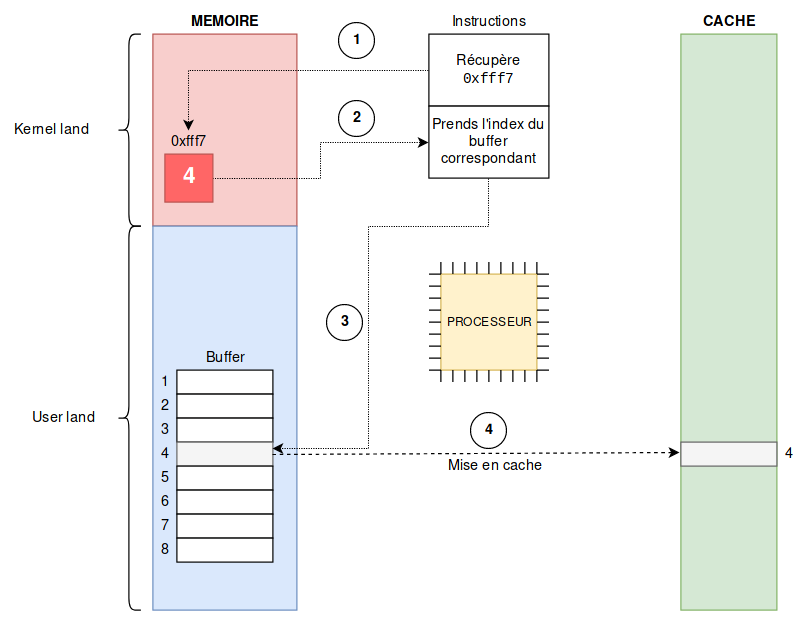
A buffer is constructed beforehand, with several sections that, when cached, are cached independently of one another. In the example, we will take 8 sections.
The idea is to find a secret value in the kernel between 0 and 7, and access the corresponding index of the buffer, so that this index is cached.
In our example, to retrieve a value between 0 and 7, you need to retrieve 3 bits of information (which gives 8 possibilities 000, 001, 010, …, 111) in kernel-land at a given address. Let’s say for the example that at address 0xfff7 of the kernel memory area, there are the 3 bits 100, or 4 in decimal. This is call (1) on the diagram. This value will be used for the next instruction (2).
Obviously, access to the kernel area is forbidden, so a SIGSEGV exception (Segmentation Fault) will be raised, but as we have seen that processors execute instructions in parallel, the following instructions can be executed at the same time.
Thus, the next instruction will access the 4th section of the buffer (3 on the diagram) that we prepared beforehand (4 being the value found in the kernel memory). This section of the buffer will then be cached by the processor (4 on the diagram).
The processor will then realize that the access to the kernel area was forbidden, and will cancel the instruction we just made, but the trace in the cache is not deleted.
The pseudo-code that can be associated with this attack is as follows:
secret_var = kernel_space[0xfff7]; // secret_var == 4 in the example
junk = buffer[secret_var]; // Access to the buffer index corresponding to the retrieved value
Reading the exfiltrated information
The second part consists of extracting this value so the attacker knows it. Indeed, for the moment, there has only been caching, and it is not possible to directly read this cache.
To do this, we use techniques called cache side-channel attacks. We’ll use the one called flush + reload to recover the information. There are others such as Evict+Time or Prime+Probe which we won’t see in this article, but you can take a look at this article which talks about them if you’re curious.
The attacker will then simply flush the cache, then carry out the attack, and finally access all the sections of the buffer they had prepared by measuring the access times to each section.
// Flush

flush(buffer)

// Attack

/* A portion of the buffer will be cached, as seen previously */

// Reload

int i;

for (i=0; i<8; i++)
{
    printf("[%d] %d\n", i+1, access_time(buffer[i]));
}
This will give an output like
[1] 231
[2] 229
[3] 304
[4] 32  // <--- Fastest access time, so section was cached
[5] 274
[6] 299
[7] 257
[8] 311
The information is therefore now known. Since section 4 is the one in cache, this means that it was the value 4 that was at address 0xfff7 in the kernel.
By looping over the addresses reserved for the kernel, we can read the contents of this forbidden memory area, 3 bits at a time, until we have all of its contents.
In reality
In our example, we chose a buffer of 8 sections to extract information from the kernel 3 bits at a time. However, in reality, you should know that the processor caches cache lines, which are blocks of data of a certain size, on the order of 64 bytes. These cache lines are included in pages. On my machine, a page represents 4096 bytes
pixis@hackndo:~/spectre-meltdown $ getconf PAGESIZE
4096
Furthermore, it is more interesting to extract information byte by byte, so retrieve 8 bits at a time. Each byte being able to take 256 values, it is appropriate to create a buffer of size 256 pages, each page representing a piece of data. Thus, the data are all at least the size of a page apart. Here is an example of buffer initialization with these parameters
#define PAGE_SIZE 4096
#define BYTE_SIZE 256

char buffer[PAGE_SIZE*BYTE_SIZE];
The buffer will therefore look like this diagram:
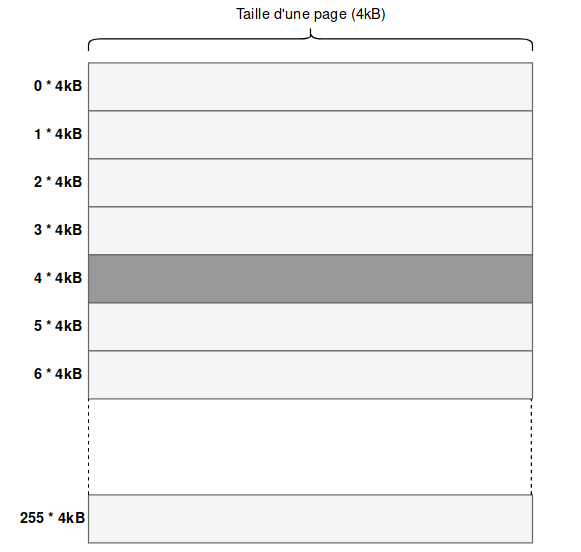
The pseudo-code we had previously then becomes
secret_var = kernel_space[0xfff7]; // secret_var == 4 in the previous example
junk = buffer[secret_var * PAGE_SIZE]; // The page at index 4*4kB will be cached
The principle remains exactly the same with these parameters.
Spectre
While Meltdown used a flaw in certain processors that allowed reading kernel addresses, the Spectre attack, for its part, does not use a flaw, but only the prediction (speculative) and cache optimizations we talked about at the beginning of the article in order to be able to read any value in the user-land of a victim process.
The idea of Spectre is to train the processor to follow a certain path when a decision must be made by using the prediction optimization, then to take advantage of this trained decision-making so that the processor takes the desired branch even though the condition is no longer met.
Reminder
As a small digression that will be useful later, I remind you that an array in C is a variable that contains the address of the first element of the array. Therefore we have the following equality:
char array[] = "Hello";
array == &(array[0]);
Also, I remind you that accessing the
ithelement of an array by writingarray[i]is strictly equivalent to writing*(array + i). Indeed, theithelement is at addressaddress_of_first_element + i, butarray = address_of_first_elementso theithelement is at addressarray + i, and to retrieve this element, we dereference it, giving*(array + i). Hence the following equality:char array[] = "Hello"; array[2] == *(array + 2);
Let’s take the following example
if (i < len_array1)
{
    var = array2[array1[i]];
}
The attacker will have done preliminary work that will have accustomed the processor to the fact that i is less than the length of array array1 and therefore that the condition is true.
Thus, on the next execution, the processor relying on the Branch Target Buffer (BTB) will think that, like before, i should be less than the size of the array, so even before the check is done, it will execute the next instruction to save time, namely var = array2[array1[i]];. Only this time, the attacker has decided to use an arbitrary i, which they control, and which is greater than the size of array array1.
The consequence is that the instruction var = array2[array1[i]] will be executed anyway in prediction, so array1[i] will be evaluated, and will be worth, for example, 12. Once this value is found, 12 in the example, the index 12 of array array2 will be read, and the content will be assigned to var.
Of course, the processor will then realize that the i provided was not valid, so it will cancel the pre-executed instructions, so var will ultimately have no value. However, the memory area corresponding to array2[12] (with 12 = array1[i]) will still have been cached, leaving a trace.
Once this caching is done, in the same way as for Meltdown, the flush + reload technique is used to see which index of array2 was cached, allowing us to discover the secret value array[i] with i being too large normally to pass the initial test.
To generalize and find the value at any address, and with the help of the reminder above, we know that array1[i] is equivalent to *(array1 + i) or *(&array1[0] + i). So if the attacker wants to see what happens in memory at address 0xbfff1234 for example, a simple calculation lets us find the i they must provide
// We want this
&(array1[i]) == 0xbfff1234;

// However
&(array1[i]) == (&array1[0] + i) == (array1 + i);

// Therefore
i = 0xbfff1234 - array1;
With this calculation in mind, the attacker can extract any byte from the memory of the running program, including hidden areas containing passwords, cryptographic keys, or other secrets.
Conclusion
These two attacks are getting a lot of attention because there is no obvious and simple way to patch them, and therefore to protect against them.
Regarding Meltdown, it is for example possible to completely change the memory management mode by ensuring that the kernel and the process have two separate address spaces, as we saw in the article the kernel world. Thus, we can switch from the left mode (sharing address space) to the right mode (separation of address spaces)
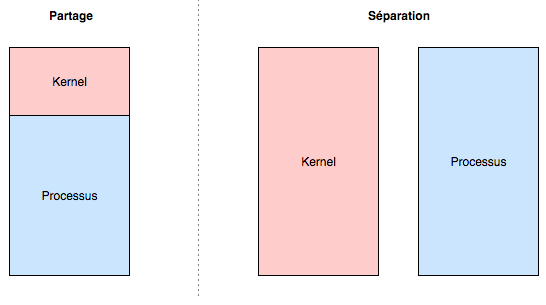
Obviously, the processor will often have to change execution context (user - kernel), and will then have to cache a lot of information since it will have to alternate between two independent address spaces, hence the performance drops being talked about.
As for Spectre, it is much more complicated to find a way to protect against it. Indeed, the attack uses elements intrinsic to the architecture of the computer, without using a vulnerability, and without accessing memory areas forbidden by the hardware. The operation of the optimizations therefore needs to be thoroughly reviewed.
I invite you to read the post by @xhark on the subject for more information on solutions and updates. He has done a very good job of summarizing, so I won’t redo his work.
For more details on the attacks, I’m also including the whitepapers here for meltdown and spectre.
I hope this article helps you see things more clearly. As always, feel free to comment or find me on Discord for more information, remarks, corrections, etc.