


Assembly - Basics
Hi everyone, here is a new article which will, I think, clarify many concepts I have already discussed in my previous articles, and which will also make it easier to understand upcoming articles.
This article has a modest goal: To understand the output of a disass main on a relatively simple program (Yes, you know, that command in gdb that allows you to disassemble - i.e. produce the assembly code of - a binary).
(gdb) set disassembly-flavor intel
(gdb) disass main
Dump of assembler code for function main:
   0x080483f2 <+0>:     push   ebp
   0x080483f3 <+1>:     mov    ebp,esp
   0x080483f5 <+3>:     sub    esp,0x18
   0x080483f8 <+6>:     mov    DWORD PTR [esp+0x4],0x2
   0x08048400 <+14>:    mov    DWORD PTR [esp],0x28
   0x08048407 <+21>:    call   0x80483dc <add>
   0x0804840c <+26>:    mov    DWORD PTR [ebp-0x4],eax
   0x0804840f <+29>:    mov    eax,DWORD PTR [ebp-0x4]
   0x08048412 <+32>:    leave
   0x08048413 <+33>:    ret
End of assembler dump.
(gdb) set disassembly-flavor att
(gdb) disass main
Dump of assembler code for function main:
   0x080483f2 <+0>:     push   %ebp
   0x080483f3 <+1>:     mov    %esp,%ebp
   0x080483f5 <+3>:     sub    $0x18,%esp
   0x080483f8 <+6>:     movl   $0x2,0x4(%esp)
   0x08048400 <+14>:    movl   $0x28,(%esp)
   0x08048407 <+21>:    call   0x80483dc <add>
   0x0804840c <+26>:    mov    %eax,-0x4(%ebp)
   0x0804840f <+29>:    mov    -0x4(%ebp),%eax
   0x08048412 <+32>:    leave
   0x08048413 <+33>:    ret
End of assembler dump.
But heavens, what does this gibberish mean? And why has the same command produced two different results? That’s what we’re going to see now, this code will have no more secrets for you…;
Syntax
First, we will explain why the same command produced two (not really) different results. It’s simply a matter of syntax. There are two main syntaxes to represent x86 assembly language: The Intel syntax (rather found in Windows environments) and the AT&T syntax (found in Unix environments). The differences between these two syntaxes are minimal. Before listing them, let’s see the common structure of these two syntaxes:
OPERATION [ARG1 [, ARG2]]
The operation is the name of the operation to perform. Operations take 0, 1 or 2 arguments.
To remove any ambiguity between the two syntaxes, here are the differences:
Order of parameters
When an operation takes two parameters and the operation is not commutative (i.e. a OP b and b OP a do not give the same result), it is important to know the order of these parameters. If for example we wanted to copy the number 42 into the EAX register, here are the two syntaxes we would find:
Intel:
OPERATION DESTINATION, SOURCE
Example:
mov eax, 42
AT&T:
OPERATION SOURCE, DESTINATION
Example:
mov $42, %eax
Size of parameters
Intel:
Since the size of the parameters only has to be indicated for non-immediate parameters (non-constant, therefore with an unknown size), that is to say the registers, it is simply integrated into the name of the register:
RAX, EAX, AX, AL respectively imply qword (64 bits), long (double word, 32 bits), word (16 bits) and byte (8-bit byte).
AT&T:
The names of the operations are suffixed with a letter corresponding to the size of the manipulated parameters.
q, l, w and b (as seen for the Intel syntax)
movl $42, %eax
42 will be copied into EAX, on a 32-bit size (the unoccupied space will be set to zero)
Variable prefix
Intel:
Variables are not prefixed as we have seen:
mov eax, 42
AT&T:
On the other hand, with respect to the AT&T syntax, we find a $ in front of immediate values (i.e. constants) and a % in front of registers, as in this example:
movl $42, %eax
Effective address
When talking about variables in memory, the effective address represents the address of the memory cell where the variable is stored. In x86 assembly, we have different elements to define a memory address
- base: 32-bit register (most often containing an address)
- index (Optional): 32-bit register (most often containing an address)
- scale (Optional): Factor of 1, 2, 4 or 8 multiplying index
- disp (Optional): Displacement, added or subtracted at the end of the calculation
- segreg (Optional): Memory segment (Segment Register) indicating the segment in which the data is located
Intel:
segreg:[base+index*scale+disp]
The calculation is performed, then the brackets indicate that the result is a memory address (the effective address), as in this example:
mov eax, [ ebx + ecx*2 + 0x80848c48 ]
In this example, twice the content of ECX is added to the content of EBX, to which we add the indicated offset (here 0x8084c48), which gives us a new address. The value contained at this address is assigned to EAX.
Let’s take a simpler case, to be certain we don’t get our wires crossed. Let:
ebx = 0x80000000
ecx = 0x00000002
If we find the instruction
mov eax, [ ebx + ecx*2 + 0x0000000a]
Then the content of the brackets breaks down as follows
ebx + 2*ecx = 0x80000004
Then we add the offset
0x80000004 + 0x0000000a = 0x8000000e
Then, we look up what is in memory at the address 0x8000000e, and what we find there, we put it into EAX.
AT&T:
The syntax is particular and rather counter-intuitive compared to that of Intel. Its generic form is
%segreg:disp(base,index,scale)
As in the following example:
movl 0x80848c48(%ebx,%ecx,4), %eax
An example which has the same behavior as the one given for Intel.
That’s the end of a quick summary of the differences between the two most commonly found syntaxes. Throughout my articles, I use the Intel syntax, which, although it is connoted as Windows, seems much clearer to me and therefore suited to these articles.
We will now see the most encountered instructions when disassembling a program. This list is far from exhaustive, but it will allow us to find our way around the majority of the examples I have given or will provide later.
Common instructions
Mathematical operations
SUB
Subtracts one value from another
sub eax, 42
eax = eax - 42
ADD
Adds two values
add eax, 42
eax = eax + 42
Logical operations
AND
Performs a logical AND
AND 0x5, 0x3
5 is represented in binary by 101 and 3 by 011, so a logical AND gives 001 = 0x1. This code is not useful, since the result is not saved anywhere, this operation will be done with at least one of the two parameters being a register.
XOR
Performs a logical XOR. Often used to initialize a variable to 0 via XOR var, var
XOR eax, eax
This code is very often found to initialize the eax register to zero, since a xor only gives 1 if the bits are different.
Assignments
MOV
Assigns a value to a variable
mov eax, 0x00000042
EAX will contain the value 0x00000042
LEA
Assigns the address of a variable to a variable. LEA has a particularity, which is that the second argument is between brackets, but unlike usual, this does not mean that it will be dereferenced (that is, it does not mean that the result will be the variable located at the address between brackets).
LEA eax, [ebp - 0xc]
If EBP had the value 0xbffff484, then ebp - 0xc has the value 0xbffff478, and it is indeed this address (and not the value contained at this address) that will be stored in EAX.
Stack manipulation
PUSH
Pushes the argument passed to PUSH on top of the stack
PUSH ebp
The value contained in EBP is placed on top of the stack
POP
Removes the element at the top of the stack, and assigns it to the value passed as an argument. (To be more precise, the element at the top of the stack stays where it is, and the ESP register that points to the top of the stack is updated to point to the previous value on the stack)
POP ebp
The element that was at the top of the stack is assigned to EBP, and is removed from the stack
Tests
CMP
Compares the two values passed as arguments
CMP ecx, 0x10
To compare these two elements, a signed subtraction ecx - 0x10 is performed
TEST EAX, EAX
This operation is logically equivalent to
cmp eax, 0
So this test allows to know if eax is positive or not. However, CMP performs a subtraction, which is slower than TEST which performs an AND. But the result is the same.
Jumps
There are many instructions that jump to another place in the code. An instruction that jumps whatever the condition, and others that depend on the result of a previously performed test. Without condition, we have the instruction
JMP
JMP 0x80844264
which will jump to the instruction located at the indicated address, whatever happens.
However, there are multiple conditional jumps. We are not going to see all of them in detail here, only those that we find the most. They will be presented in pairs, the condition and its negation, represented by an N (Not)
JE - JNE
Equal - Not Equal
JZ - JNZ
Zero - Non Zero
JA/JB - JNA/JNB (Unsigned)
Strictly Above/Strictly Below - Below or equal/Above or equal
JAE/JBE - JNAE/JNBE
Above or Equal/Below or Equal - Strictly below/Strictly above
JG/JL (Signed)
Greater/Lower
Functions
CALL address
The call instruction allows to call the code of another function located in a different memory space. The address passed to it as an argument allows to find this code. This call is actually a condensed version of two instructions. The first one allows to save the instruction following the call (for the return of the function, in order to resume the execution flow of the program) and the second one allows to actually jump to the desired function. As we saw in a previous article on how the stack works, the register that contains the next instruction is EIP. A call is therefore ultimately the sequence of these two instructions:
PUSH EIP
JMP address
LEAVE
Conversely, LEAVE prepares the exit from a function by retrieving the variables saved at the beginning of the function in order to find the execution context as it had been saved just before executing the code of the function, all while destroying what was left of the stackframe:
MOV ESP, EBP
POP EBP
RET
Finally, the RET instruction allows to finalize the work of LEAVE by retrieving the address of the instruction to execute after the call, an address that had been saved on the stack during the CALL instruction, and to jump to this address
POP EIP
EIP has been modified and it is the instruction located at the address contained in EIP that will then be processed.
Misc
To finish, an instruction that may seem trivial like that, but which has its certain importance: The NOP (No OPeration) instruction. This instruction… does nothing. If the processor encounters this instruction, it will simply do nothing, and move on to the next instruction.
There you have it, you have all the elements in hand to understand the disassembled program provided at the beginning of the article. Will you make it?
As I am in a good mood and I don’t like to do things halfway, we will do it together! Roll up your sleeves, here we go!
In practice
Let’s recall the code at the beginning of the article, and take only the version in the Intel syntax.
(gdb) disass main
Dump of assembler code for function main:
   0x080483f2 <+0>:     push   ebp
   0x080483f3 <+1>:     mov    ebp,esp
   0x080483f5 <+3>:     sub    esp,0x18
   0x080483f8 <+6>:     mov    DWORD PTR [esp+0x4],0x2
   0x08048400 <+14>:    mov    DWORD PTR [esp],0x28
   0x08048407 <+21>:    call   0x80483dc <add>
   0x0804840c <+26>:    mov    DWORD PTR [ebp-0x4],eax
   0x0804840f <+29>:    mov    eax,DWORD PTR [ebp-0x4]
   0x08048412 <+32>:    leave
   0x08048413 <+33>:    ret
End of assembler dump.
So you can follow along, I will refer to the lines as indicated between chevrons in the disassembled code. For example, line +3 corresponds to the line 0x080483f5 <+3>: sub esp,0x18 so to the instruction sub esp, 0x18
Here we go! We have the assembly code of the main function of a program we don’t know. The main function is a function like any other from the processor’s point of view, so it is appropriate, as with any function, to start with the 3 first lines typical of a function start (sometimes a little more, but the principle remains the same), what we call the prologue. These lines essentially allow to save the state of the previous function, and to prepare the stack for the local variables of the current function.
Line +0
push ebp
pushes the EBP register onto the stack. As a reminder, EBP (Base Pointer) is the register that contains the address of the beginning of the stackframe of the current function. As we are entering a function, we have to save the beginning of the stackframe of the previous function, which is what this line +0 does. Once this is done, we now have to give the value of our new stackframe base to EBP. As we are barely entering the function, we haven’t pushed anything that is specific to the function yet, so the current top of the stack corresponds to the base of the future stackframe of the main function. And where is the address of the top of the stack contained? You remember, in ESP (Stack Pointer! If this is unknown to you, I invite you to reread the article on how the stack works). Line +1 then saves the content of ESP into EBP
mov ebp,esp
There we go, our EBP register is ready, it points to the beginning of the stackframe of the main function. What does the next line, line +3, do?
sub esp,0x18
Exactly, it subtracts 0x18 from the ESP register. 0x18 in hexadecimal is 1x16 + 8x1 = 24 in decimal. Let’s recall that the stack grows downwards for x86 processors, this means that the more it grows, the more the address of the top of the stack decreases. By subtracting 24 from ESP, this means that we have grown the stack by 24 bytes. 24 bytes are then allocated to the main function for its local variables.
There we go, we have the EBP register that points to the beginning of the stackframe, the ESP register that points to the top of the stack, 24 bytes further.
The next two lines are relatively similar:
0x080483f8 <+6>:     mov    DWORD PTR [esp+0x4],0x2
0x08048400 <+14>:    mov    DWORD PTR [esp],0x28
These are two MOV instructions, but a little more complicated than what we have seen so far. The first of the two lines +6 puts the value 0x2 into DWORD PTR [esp+0x4]. DWORD means that 0x2 will take the place of a double word (32 bits). Since 0x2 can be stored on one byte, the other 3 will be initialized to 0. PTR [esp+0x4] indicates that 0x2 will be stored at the address esp+0x4. Let’s recall again that ESP contains the address of the top of the stack, so ESP + 0x4 contains the address of the second slot of the stack (a variable being the size of a DWORD, so 4 bytes, on a 32-bit architecture - because yes, 32 bits = 4 bytes). Line +6 therefore places the number 2 in the second position on the stack.
With these explanations, what does line +14 do?
It puts the value 0x28 (40 in decimal) at the address contained in ESP, so 0x28 is placed at the top of the stack. Here is where we are:
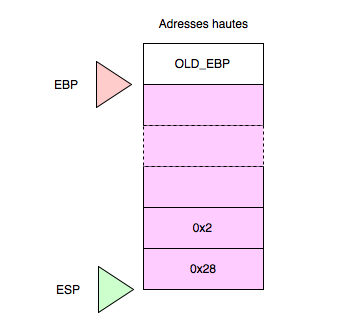
But why place these values arbitrarily like that? Why on the stack? What’s the use? Let’s look at the next line:
call 0x80483dc <add>
A CALL instruction! It calls the function located at the address 0x80483dc, and gdb has even found the name of this function for us, which is called add(). Very well, we can disassemble add to see what it’s about!
(gdb) disass add
Dump of assembler code for function add:
   0x080483dc <+0>:     push   ebp
   0x080483dd <+1>:     mov    ebp,esp
   0x080483df <+3>:     sub    esp,0x10
   0x080483e2 <+6>:     mov    eax,DWORD PTR [ebp+0xc]
   0x080483e5 <+9>:     mov    edx,DWORD PTR [ebp+0x8]
   0x080483e8 <+12>:    add    eax,edx
   0x080483ea <+14>:    mov    DWORD PTR [ebp-0x4],eax
   0x080483ed <+17>:    mov    eax,DWORD PTR [ebp-0x4]
   0x080483f0 <+20>:    leave
   0x080483f1 <+21>:    ret
End of assembler dump.
We find the same scheme on the first three lines as that of the main() function, the prologue of the function that saves the EBP of the previous function (the main function), then assigns ESP to EBP to initialize the beginning of the stackframe, and finally that shifts the top of the stack by 16 bytes so that the add function can work with its local variables.
Then the lines +6 and +9 are similar
0x080483e2 <+6>:     mov    eax,DWORD PTR [ebp+0xc]
0x080483e5 <+9>:     mov    edx,DWORD PTR [ebp+0x8]
These are two MOV instructions that initialize eax and edx. If we look at the instruction at line +12, add eax,edx, we notice that these two registers will be added together.
Furthermore, since the name of the function is add, it is a fair bet that the goal of this function is to add two numbers. Anyway, let’s get back to our two lines: We have already seen the syntax DWORD PTR [ebp + 0xc] in the main function. This means that we are going to look at the address EBP + 0xc, and we are going to take the DWORD (32 bits) that is located there. What is at EBP + 0xc? A little diagram of the state of the stack is in order
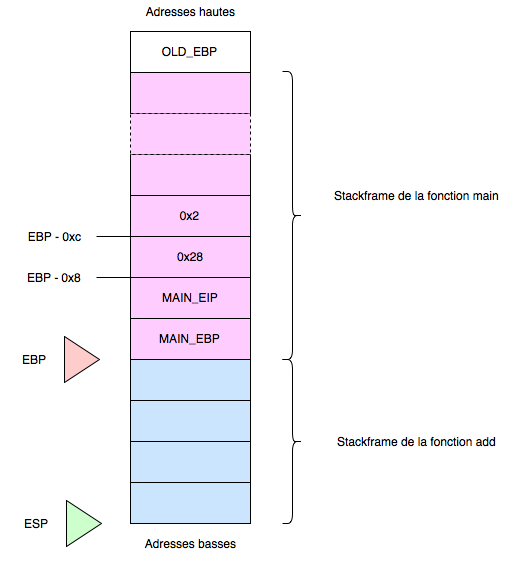
Before the function call, the two variables 0x2 and 0x28 were pushed onto the stack. Then EIP was pushed during the call and finally EBP, which explains the previous diagram. Let me remind you that the stack starts from the high addresses and grows towards the low addresses, but a variable in memory is read in the classic direction, so from low addresses to high addresses. The variable located at the address EBP - 0xc has a size of 4 bytes. These 4 bytes are EBP - 0xc + 0x0, EBP - 0xc + 0x1, EBP - 0xc + 0x2 and EBP - 0xc + 0x3.
In the previous diagram, at EBP we find the value of the save of the EBP of the calling function. Then at EBP - 0x4 is the save of EIP, at EBP - 0x8 is one of the values pushed before the call and at EBP - 0xc is the second value. We go up like that 4 by 4 because these variables are addresses (EBP and EIP) or integers so they take 4 bytes in memory.
EAX will therefore be worth 0x2 and EDX will receive the value 0x28. We saw that the next line +12 added the two values and saved the result into EAX
add eax,edx
The two lines that follow are a little more complex to understand
0x080483ea <+14>:    mov    DWORD PTR [ebp-0x4],eax
0x080483ed <+17>:    mov    eax,DWORD PTR [ebp-0x4]
The first line +14 saves the result of the calculation in the slot ebp-0x4, the first free slot of the stackframe. The second one retrieves this value, and puts it into EAX. Conventionally, EAX is the register used to save the result of a function that we want to return (return something;).
The last two lines +20 and +21 restore the state of the registers before executing the function.
leave
ret
The LEAVE instruction is actually a condensed version of the following two operations, as we saw at the beginning of this article:
MOV ESP, EBP
POP EBP
The first allows to rebase the top of the stack to the level of EBP, so it removes everything else from the stack, and the second allows to retrieve the old value of EBP to be able to return to the main function. For this, the RET function, equivalent to the following operation:
POP EIP
retrieves the value of EIP saved during the call, and jumps to this instruction to continue the rest of the program:
0x0804840c <+26>:    mov    DWORD PTR [ebp-0x4],eax
0x0804840f <+29>:    mov    eax,DWORD PTR [ebp-0x4]
We saw previously that the result of add was returned in EAX. This result is saved in the first slot of the stackframe, then is again assigned to EAX exactly like the end of the add function. Again, this means that it is the return value of the main function.
We then leave the main function as we left the add function:
0x080483f0 <+20>:    leave
0x080483f1 <+21>:    ret
Perfect! We have seen everything!
Have you guessed the C code of the program after this study? Two numbers 0x2 (2) and 0x28 (40) are sent to the add function, which returns their sum, which the main function also returns:
##include <stdio.h>
int add(int a, int b)
{
    int result = a + b;
    return result;
}

int main(int argc)
{
    int answer;
    answer = add(40, 2);
    return answer;
}
Did you have the same thing? Congratulations! I hope this article was useful to you. If notions or paragraphs need to be clarified, do not hesitate to post comments, I’m open to any suggestions!